A content calendar is the difference between publishing on purpose and publishing whatever you can pull together on deadline. It maps what you will create, for whom, on which channel, and when, turning a vague intention to “post more” into a schedule your team can actually run. This guide walks through building one you can sustain for a full year, from goals and pillars to tools, workflow, and measurement.
Table of Contents
What Is a Content Calendar and Why It Matters
At its simplest, a content calendar is a single source of truth for everything you plan to publish. Each row or card holds a topic, a format, a target channel, an owner, a due date, and a status, so ideas stop living in scattered notes, chat threads, and inboxes and instead sit in one place the whole team can see.
The payoff is less about tidiness than about consistency. Audiences and search engines both reward a steady rhythm, and a plan removes the weekly scramble that leads to skipped weeks or thin, rushed posts. It also makes gaps obvious: you can spot a month with no bottom-of-funnel content long before it becomes a pipeline problem.
This works at any scale. A solo founder and a ten-person marketing team need the same core discipline; only the number of rows and the tooling change. The goal is not a beautiful spreadsheet but a habit of deciding in advance so execution becomes routine.
There is a compounding benefit, too. Once a month or a quarter is mapped out, each individual decision gets easier, because you are slotting a piece into an existing plan rather than reinventing your approach every week. That saved mental energy is often what lets small teams keep publishing long after motivation alone would have run out.
- Consistency: a cadence you can hold, not a burst you abandon
- Visibility: everyone sees what is coming and who owns it
- Balance: a deliberate mix of topics, formats, and funnel stages
- Fewer fire drills: deadlines are planned, not discovered on Friday
Start With Goals, Audience, and Content Pillars
Before you touch a template, decide what the content is actually for. A plan built for organic search looks different from one built for brand awareness or lead nurture. Tie each goal to a metric you can track, such as organic sessions, email signups, or demo requests, so you can later judge whether the effort worked instead of guessing.
Then get specific about who you are writing for. List the two or three audience segments that matter most, the questions they ask at each stage, and the exact words they use to ask them. A little keyword research here pays off twice: it grounds your topics in real demand and gives you the phrases to write around.
It also helps to sort topics by funnel stage from the outset. Awareness pieces answer broad questions and pull in new readers, consideration pieces compare options and build trust, and decision pieces tackle the objections people raise close to a purchase. Aim for a deliberate mix rather than a pile of top-of-funnel posts that attract traffic but rarely convert.
This is where a documented content marketing strategy earns its keep, keeping every entry pointed at a real reader and a real outcome rather than filling slots for their own sake. Search engines reward exactly this kind of intent; Google’s own guidance on creating helpful content is a sensible baseline to design around.
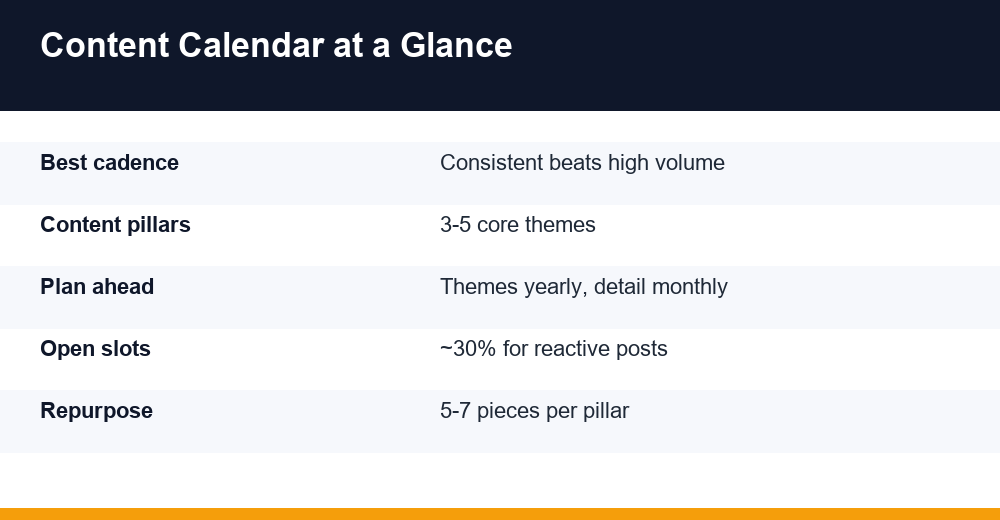
Content pillars are the three to five themes you want to be known for. They keep your output coherent and make planning faster, because every new idea has an obvious home. A project-management tool might pick productivity, remote work, and product education; a neighbourhood bakery might pick recipes, behind-the-scenes, and local events.
- Ties to a business goal and a genuine buyer question
- Broad enough for dozens of ideas, yet distinctive to you
- Maps across funnel stages, from awareness to decision
Choosing Your Cadence and Content Formats
How often should you publish? Often enough to stay top of mind, rarely enough that quality never slips. Consistency beats volume every time: a weekly post you keep up for a year will out-earn a daily sprint you abandon in March. Match the cadence to your real capacity, not your ambition.
| Team size | Realistic weekly output | Notes |
|---|---|---|
| Solo / founder | 1 post, 2-3 social updates | Protect one deep piece |
| Small (2-3 people) | 2-3 pieces, daily social | Hold a steady rhythm |
| Larger (4+ people) | 3-5 pieces, multi-channel | Add video and repurposing |
Batching helps almost everyone: draft several pieces in one focused block rather than starting cold each day. And vary your formats so you are not betting everything on one channel. Long-form guides capture search intent, short video and carousels drive discovery, newsletters deepen loyalty, and case studies help close deals. For channel-specific rhythm, our Instagram marketing tips go deeper than any general plan can.
Set a minimum quality bar and defend it. Publishing one strong piece a week beats three thin ones that chip away at your credibility, so when capacity dips, cut quantity before you cut standards. A realistic rhythm you rarely miss also builds trust with readers and search engines alike, both of which reward reliability far more than sporadic bursts of activity.
One habit worth adopting in 2026: leave roughly a third of your slots open for reactive content, whether that is a trending topic, a sharp customer question, or a timely response to industry news. A schedule booked solid has no room to move when something genuinely matters.
Tools: Spreadsheet vs. Dedicated Apps
Your content calendar can live anywhere from a free spreadsheet to a dedicated platform; what matters is that it stays current and shared. Here is how the common options compare.
| Option | Best for | Trade-off |
|---|---|---|
| Spreadsheet (Sheets/Excel) | Starting out, small teams | Manual, no reminders |
| Airtable / Notion | Custom views and databases | Setup and learning curve |
| Trello / kanban boards | Visual, lightweight flow | Weak scheduling views |
| Asana / monday.com | Team workflow and automation | Overkill for solo use |
| Social schedulers | Publishing and analytics | Less suited to long-form |
Match the tool to your real bottleneck, not the feature list. If approvals are the pain point, prioritise review states and comments; if publishing is the chore, a scheduler that posts for you saves the most time; if you simply need visibility, a shared board is plenty.
Above all, do not over-tool. A well-kept spreadsheet with a clear owner beats an expensive platform nobody updates. Start simple, feel where the friction is, and upgrade only when scale, collaboration, or approvals genuinely demand it.
Workflow, Roles, and Approvals
A plan is only as good as the workflow behind it. Give every entry a status so anyone can see where it stands at a glance, and agree on who moves it to the next step. Clear statuses are what stop pieces from quietly stalling between people.
- Idea: captured and roughly scoped
- Approved: greenlit against goals and pillars
- In progress: assigned with a due date
- Review: edited and checked for accuracy and SEO
- Scheduled: queued in the publishing tool
- Published: live, with the final link recorded
Name the humans, not just the tasks. Even a two-person team benefits from explicit roles, so nothing waits on an unnamed “someone”. The most common bottleneck is approval, so decide up front who signs off and give that person a deadline too.
- Owner: accountable for the piece shipping on time
- Writer or creator: produces the draft
- Editor: quality, accuracy, brand voice, on-page SEO
- Approver: final sign-off before scheduling
Build in realistic lead times as well. Work backwards from each publish date so drafting, editing, and design each get the days they need, then add a small buffer for the piece that inevitably slips. When deadlines are set against the plan rather than invented on the spot, everyone can pace their work and last-minute scrambles become the exception.
Whatever tool you choose, the schedule only works if statuses stay honest. A board that claims everything is on track while three pieces have quietly stalled is worse than no board at all, because it hides the problem. Make updating status part of each handoff, and review the pipeline together weekly so blockers surface while there is still time to fix them.
A Sample One-Year Content Calendar
Planning a year does not mean scripting two hundred posts in January. It means setting quarterly themes and seasonal tentpoles now, then filling in weekly detail a month or so ahead. Here is a condensed example for a B2B software brand.
| Quarter | Theme | Pillar content | Repurposed / social | Primary goal |
|---|---|---|---|---|
| Q1 | New-year planning | 2 guides, 1 template | Newsletter + 8 posts | Organic traffic |
| Q2 | Product education | 2 how-tos, 1 webinar | Clips + carousels | Activation |
| Q3 | Customer proof | 2 case studies | Quote graphics + video | Leads |
| Q4 | Trends and planning | 1 report, 1 roundup | Newsletter + LinkedIn | Authority |
Read it top to bottom for the year and left to right within each quarter. The pillar content anchors the plan, the repurposed column keeps the schedule full without doubling your writing load, and the goal column keeps you honest about why each block exists.
Treat the quarters as a starting point, not a rule. A retailer might build the year around seasonal peaks, while a services firm might anchor it to conference season or budget cycles. The structure matters more than the specifics: choose recurring themes, attach a clear goal to each, and give repurposing a permanent column so it is never treated as an afterthought.
Zoom into a single month and the weekly detail might look like this:
- Week 1: publish the pillar guide on Tuesday; three social excerpts across the week
- Week 2: send a newsletter featuring the guide; post one short video
- Week 3: publish a supporting how-to; repurpose it into a carousel
- Week 4: share a case study or roundup; hold one open slot for reactive content
Repurposing: Get More From Every Piece
Teams that seem to produce endlessly are usually repurposing well, not writing more. Plan it at the calendar level so it is scheduled deliberately, rather than squeezed in as an afterthought once the energy runs out.
- One pillar guide becomes a newsletter edition
- …then three to five social posts or carousels
- …then a short video or audio clip
- …then an updated answer in your FAQ or help docs
Think of one core asset feeding many channels. A single research report can seed a blog summary, a slide deck, an email series, and a month of social posts, each shaped for how people consume that channel rather than copied word for word. The skill is adapting the format and framing to each platform, not reposting the same block of text everywhere.
A single webinar, for instance, can yield a recap post, a highlights reel, several quote cards, and a downloadable checklist. Timing matters too: stagger repurposed pieces two to four weeks after the original rather than dumping them all on the same day. You keep a steady presence, reach people who missed the first pass, and stretch the value of work you have already paid for.
Measuring Results and Adjusting
A plan you never review slowly drifts from reality. Set a recurring check-in, a quick monthly pulse and a thorough quarterly reset, and judge entries against the goals you set at the start rather than vanity numbers that feel good but change nothing.
- Reach and traffic: impressions, organic sessions, new visitors
- Engagement: time on page, saves, shares, and comments
- Conversion: signups, downloads, demos, and sales
- Efficiency: output held versus planned, and cost per piece
Separate leading indicators from lagging ones. Publishing consistency, output quality, and early engagement tell you quickly whether the system is healthy, while traffic, rankings, and revenue take months to move. Judging a young plan only on the slow numbers can make a working system look like a failure, so track the fast signals to stay steady between quarterly reviews.
It is also worth watching whether AI search and assistants surface your work, since clear, well-structured pages increasingly get cited there too. Then act on what you learn: double down on the pillars and formats that earn attention, retire the ones that do not, and roll unfinished ideas forward. A content calendar is a living document, and the point is to learn from each quarter and plan the next one a little smarter.
Frequently Asked Questions
What is the difference between a content calendar and an editorial calendar?
In practice they overlap heavily. An editorial calendar traditionally focuses on articles and publication dates, while a content calendar spans every channel, from blog and social to email and video, plus owners and status. Most teams now use the two terms interchangeably for a single planning hub.
How far ahead should I plan my content?
Plan at two zoom levels. Sketch quarterly themes and seasonal moments up to a year out, then lock weekly detail three to six weeks ahead. This keeps your direction stable while leaving room to react to news, trends, and the questions your audience actually raises.
Do I need paid software to manage a calendar?
No. A shared spreadsheet handles a surprising amount, and it is free, flexible, and familiar. Move to a tool like Airtable, Notion, Asana, or Trello only when you need database views, automated reminders, or formal approval steps that a simple spreadsheet cannot enforce for you.
How often should I review the plan?
Review lightly every month and thoroughly each quarter. The monthly pass checks what shipped and what slipped; the quarterly reset compares results against your goals, retires weak formats, and shapes the next three months. Treat the plan as a living document, not something fixed in stone.