Facebook ads remain one of the most accessible ways to put your business in front of a large, precisely targeted audience without a huge upfront budget. This guide walks a complete beginner through 2026: how the system works, how to set it up correctly, and how to spend money without wasting it. Expect plain language, real steps, and honest caveats, with no hype.
Table of Contents
What Facebook ads are and how they work
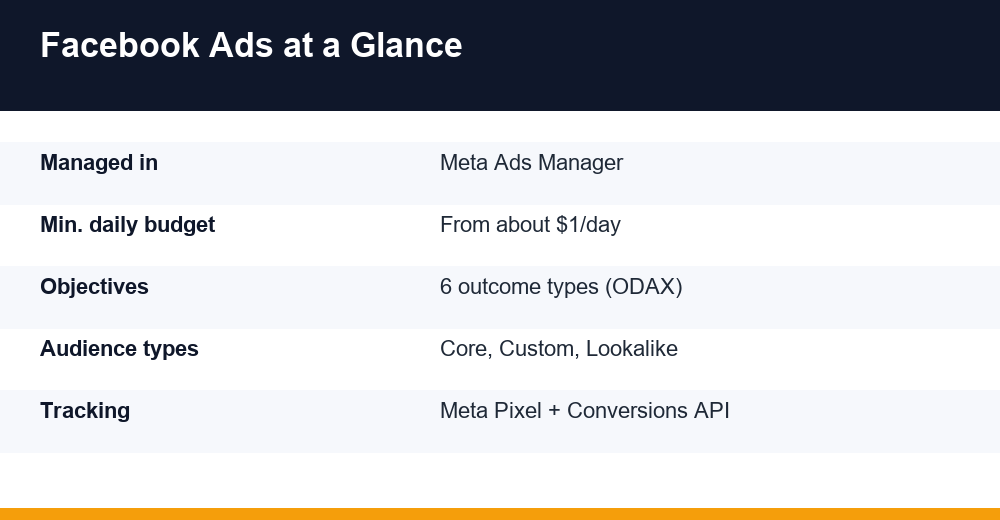
At its core, this is paid promotion running across Meta’s family of apps: Facebook, Instagram, Messenger and the Audience Network, all managed from a single dashboard called Meta Ads Manager. You decide who sees your message, what it looks like, where it appears and how much you are willing to pay.
Two things make the platform powerful even on small budgets: reach and precision. Billions of people use these apps daily, and Meta knows enough about their interests and behaviour to show your ad to the slice most likely to care. That combination is why a local shop and a global brand can advertise side by side.
Behind every impression is an auction. You do not buy a fixed number of views; you compete for them. Meta weighs your bid against your ad’s estimated action rate and its quality, then serves the ads it expects to perform best for the lowest cost. In practice, relevant and engaging creative usually costs less to run than dull creative.
Campaigns are built in three layers. Learning them early prevents a lot of confusion later:
- Campaign sets the objective, the single goal for everything beneath it.
- Ad set controls the audience, budget, schedule and placements.
- Ad is the creative people actually see: the image or video, headline and link.
It also helps to know where this channel sits next to search advertising. For a side-by-side breakdown, see how the two platforms compare; and if buyer intent is central to your product, our Google Ads for beginners guide covers that route in detail.
Setting up your account and the Meta Pixel
Before spending a cent, get your foundations right. Everything is organised through Meta Business Suite and its Business settings, which hold your Page, ad account, payment method and team permissions in one place. Setting this up as a business asset, rather than through a personal profile, protects you if you later add staff, a freelancer or an agency.
- Create or claim a Meta Business Suite account and connect your Facebook Page.
- Create an ad account and add a payment method.
- Turn on two-factor authentication to protect your assets.
- Install the Meta Pixel, and ideally the Conversions API, on your website.
- Verify your domain and configure your key events in Events Manager.
The Meta Pixel is a small snippet of code on your site that reports what visitors do after they click: pages viewed, items added to cart, purchases completed. That data teaches the system who to look for and lets you measure whether ads actually drive sales. Install it before your first campaign, even a basic awareness one, so you begin gathering signal immediately.
Because operating systems and browsers now block much of this tracking, Meta recommends pairing the Pixel with the server-side Conversions API, which sends events directly from your server. Together they recover data that would otherwise vanish. You can follow the current setup steps in Meta’s official Business Help Center.
Choosing the right campaign objective
Your objective is the single most important setting you will choose, because Meta optimises delivery around it. Under the current ODAX framework (Outcome-Driven Ad Experiences) there are six objectives, each mapped to a stage of the buyer’s journey. Choose the outcome you genuinely want, not the one that sounds most ambitious.
| Objective | Best used for | Funnel stage |
|---|---|---|
| Awareness | Reaching the most people cheaply | Top |
| Traffic | Sending clicks to a site or app | Top / Middle |
| Engagement | Messages, video views, interaction | Middle |
| Leads | Form fills, sign-ups, inquiries | Middle |
| App promotion | Installs and in-app actions | Middle / Bottom |
| Sales | Purchases and conversions | Bottom |
A classic beginner error is chasing Sales with a brand nobody has heard of yet. Because Facebook ads are optimised around the outcome you pick, a conversion objective needs enough pixel data, roughly 50 events per week per ad set, to deliver efficiently. Starting cold? Begin with Traffic or Engagement to build audiences and data, then move up to Leads or Sales.
You will also decide where to hold the budget. Advantage campaign budget (formerly CBO) pools spend at the campaign level and lets Meta shift it toward the best-performing ad set automatically, a sensible default once you are running more than one ad set.
Audience targeting: core, custom, and lookalike
Targeting is one of the platform’s biggest strengths. Three foundational audience types exist, and strong accounts use all three in combination:
- Core audiences are built from scratch using location, age, gender, interests and behaviours; best for reaching new, cold prospects.
- Custom audiences are people who already know you: website visitors via the Pixel, customer email lists, video viewers, or people who engaged with your Page or Instagram.
- Lookalike audiences are new people who resemble a chosen custom audience, letting Meta find prospects similar to your best customers.
In 2026 the trend runs toward broader targeting. Meta’s system has improved to the point where tightly stacked interests often hurt results. Many advertisers now supply a strong custom audience or lookalike as a seed, then let Advantage+ audience widen the net on its own.
A durable structure is the classic funnel: reach cold prospects with core or lookalike targeting, then retarget warm visitors and past customers with custom audiences. Retargeting is usually the cheapest, highest-return spend you will find, so do not skip it. Remember to exclude existing customers where it makes sense, so you are not paying to reach people who already converted.
One legal caveat: if you promote housing, employment, credit, or social, electoral and political issues, Meta places you in a special ad category with restricted targeting. Declare it honestly, because misclassified ads get rejected, and the rules exist to prevent discrimination.
Ad formats and creative that convert
With so much targeting automated, the creative itself is now your biggest lever. Meta offers several formats, each suited to different goals:
- Single image is simple and fast to produce; ideal for testing a message.
- Video is best for storytelling and demonstrations; the first few seconds decide whether anyone stays.
- Carousel places several images or videos in one ad, great for product ranges or step-by-step points.
- Collection is a mobile shopping layout pairing a hero image or video with product tiles.
- Reels and Stories are full-screen vertical placements that keep growing as attention shifts to short video.
Whatever the format, a handful of creative principles hold up year after year:
- Design for mobile and sound-off; most people scroll on a phone with the volume down.
- Lead with the hook, the offer or the problem, in the first line and first frame.
- Add captions to video and keep on-image text light.
- Make the value obvious within seconds, and match the ad’s promise to its landing page.
Shoot several rough variations rather than one polished masterpiece, because variety beats perfection and you cannot reliably predict which angle will land. Watch for ad fatigue too: when frequency climbs and results dip, it is time to refresh the creative. Authentic, user-generated-style content often outperforms glossy studio work in the feed.
Budgets, bidding, and testing
You set spend at either the campaign or ad-set level. Meta lets you start small, with daily budgets that can be very low, but tiny budgets learn slowly and can stall. Give each ad set enough room to gather data, and expect a learning phase of roughly a week while delivery stabilises. Avoid big edits during it, because changes reset that learning.
There is no fixed price for a result. What you pay depends on your audience, industry competition, creative quality and the season, and costs typically rise around major shopping periods. Rather than fixating on published benchmarks, watch your own trend and whether each campaign returns more than it costs.
For bidding, beginners should let Meta optimise automatically instead of setting manual caps. Your energy is far better spent on the offer and creative, which move results much more than bid adjustments.
Testing is what separates profitable campaigns from expensive guesswork. Change one variable at a time so you know what caused a result:
- Test creatives first, since they have the biggest impact on performance.
- Then test audiences, offers and placements, in that order.
- Use Meta’s built-in A/B test tool for clean, fair comparisons.
- Give each test enough budget and time to reach a reliable result before deciding.
Finally, judge campaigns on outcomes that matter, such as cost per lead, cost per purchase and return on ad spend (ROAS), not vanity metrics like reach or likes.
Scaling what works without breaking it
Once a campaign returns a profit reliably, the instinct is to pour money in fast. Resist it. Sudden budget jumps can throw an ad set back into learning and undo the economics you just proved. Scale in steady, deliberate steps, and protect the setup that is already working before you reach for more.
There are two broad ways to grow, and most accounts use both:
- Vertical scaling raises an ad set’s budget gradually, around 20 percent every few days, so delivery re-stabilises without a hard reset.
- Horizontal scaling duplicates a proven winner into fresh audiences, new lookalikes or added placements to reach untapped demand.
- Advantage+ campaigns hand more of the audience and budget work to Meta and, for many e-commerce sellers, scale cleanly.
- Creative refresh feeds new variations in before fatigue sets in, so a growing campaign never runs dry.
Watch two signals as you grow: frequency, meaning how often each person sees your ad, and your cost per result. When frequency climbs and cost per result drifts up together, you have likely saturated the audience: widen it or refresh the creative rather than simply spending harder. Scaling facebook ads profitably is a rhythm of small, tested steps, not one big leap.
Privacy changes and measuring results
Privacy changes reshaped how facebook ads are measured, and every beginner should understand why the numbers do not always add up. Since Apple introduced App Tracking Transparency in 2021, many iPhone users opt out of tracking, and browsers have been phasing out third-party cookies. Meta simply sees less than it once did.
Meta’s response combines server-side data through the Conversions API, modelled conversions that estimate what tracking misses, and Aggregated Event Measurement, which caps you at a set number of prioritised events per domain. The practical steps for you are straightforward:
- Install both the Pixel and the Conversions API for the fullest picture.
- Verify your domain and rank your most important events in Events Manager.
- Expect reporting delays and gaps; in-platform figures will not perfectly match your own analytics.
- Cross-check against real business data: actual sales, revenue and new customers.
Attribution windows also shrank, so a purchase made a week after a click may never be credited. Treat Ads Manager as a strong directional signal rather than gospel, and always tie performance back to money in the bank.
Common beginner mistakes to avoid
Most wasted budget on facebook ads traces back to a short list of avoidable mistakes. Scan this before you launch:
- Boosting posts instead of building a proper campaign in Ads Manager, which offers far more control.
- Picking a Sales objective with no pixel data, then wondering why delivery is poor.
- Editing ad sets constantly and resetting the learning phase every few days.
- Judging results too early, before tests reach reliable numbers.
- Over-narrow targeting that starves the system of room to optimise.
- Sending clicks to a slow or confusing landing page that undoes good ad work.
- Ignoring frequency until ad fatigue quietly erodes your returns.
Avoid these, keep your objective honest, and let strong creative do the heavy lifting. Consistent testing and clean measurement will teach you more about your customers than any guide can, including this one.
Frequently Asked Questions
How much do I need to spend to start with Meta ads?
There is no meaningful minimum beyond Meta’s low daily floor, but a realistic test budget lets each ad set gather data without starving. Start with an amount you can sustain for two to three weeks, focus on one clear objective, and scale spending only once you see profitable results.
Do I really need the Meta Pixel?
Yes. The Pixel, ideally paired with the Conversions API, tracks what visitors do after clicking and feeds Meta the signals it needs to optimise and to measure sales. Install it before your first campaign so you collect data from day one, even for simple awareness campaigns.
Facebook or Instagram, where should my ads run?
Let Meta decide at first. Advantage+ placements automatically spread your budget across Facebook, Instagram, Reels, Stories and more, then shift spend toward whatever performs. Once you have data, review the placement reports and exclude any that consistently waste money for your particular offer.
How long before I see results?
Expect a learning phase of roughly a week while delivery stabilises, and avoid major edits during it. You will often see early engagement within a day or two, but give any test enough time and budget to reach reliable numbers before judging whether it worked.