This google ads for beginners guide has one goal: getting your first campaign live without wasting money. Google Ads can feel like a wall of jargon on day one, yet the platform rests on a handful of clear ideas you can learn in an afternoon. Work through the steps below in order and you will understand account structure, match types, bidding, and conversion tracking well enough to launch with confidence.
Table of Contents
How Google Ads for Beginners Actually Works
Google Ads runs on an auction, but not the kind where the biggest budget always wins. Each time someone searches, Google holds a split-second auction among advertisers whose keywords match the query. Your position is set by Ad Rank, which blends your bid with how relevant and useful your ad is likely to be. That is why a small advertiser with a sharp, relevant ad can outrank a larger one who simply bids on broad terms.
Here is what that means in practice. Imagine two plumbers bidding on the same search. The one whose ad and landing page speak directly to “emergency drain cleaning” can win the top spot while paying less per click, because Google rewards relevance. That idea runs through this whole guide: relevance is not a nicety, it is a discount.
The second idea to grasp is intent. Someone typing “emergency electrician near me” has a problem right now, which is very different from someone idly scrolling social media. Google Ads lets you reach people at the moment they are looking for what you sell. If you are weighing where to spend first, our comparison of Google Ads vs Facebook Ads explains when search intent beats interruption.
One point every google ads for beginners guide stresses is simple: you pay only when someone clicks your ad, not when it appears. You also rarely pay your full maximum bid, because the auction charges just enough to hold your position.
Where do those ads appear? Depending on the campaign type, they can show above and below the organic search results and across Google’s wider network, including partner sites, Maps, Shopping, and YouTube. Because you are charged per click, a wasted click is wasted budget, so almost everything that follows is about earning more of the right clicks and fewer of the wrong ones.
Account Structure: Campaigns, Ad Groups, and Keywords
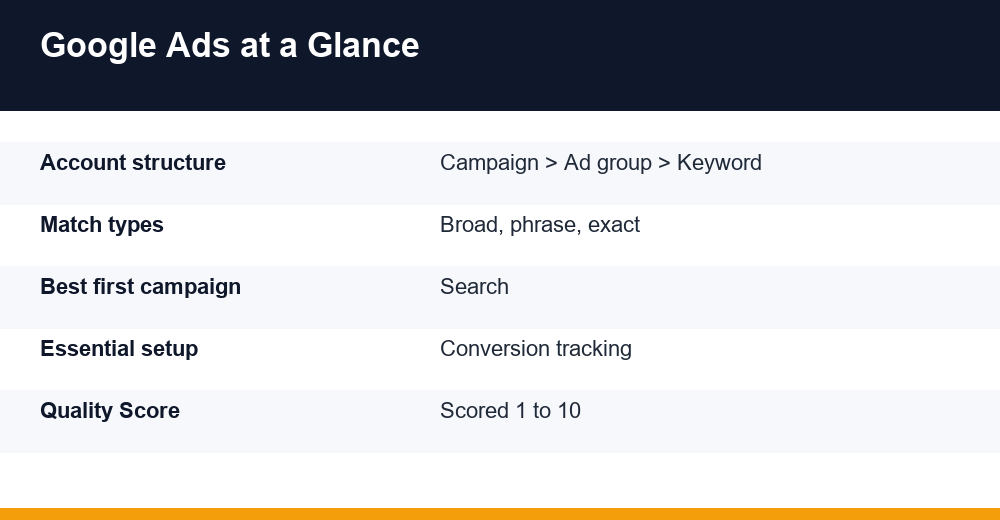
Most beginner problems trace back to a messy account. Google Ads uses a simple three-level hierarchy, and keeping it tidy is the single biggest lever you have over performance and cost.
| Level | What it controls | Example |
|---|---|---|
| Campaign | Budget, locations, campaign type, bid strategy | Plumbing – Chicago |
| Ad group | A tight theme with its keywords and ads | Emergency drain cleaning |
| Keyword and ad | The search you bid on and the message shown | emergency drain cleaning near me |
Settings cascade downward: budget and targeting sit at the campaign level, while the keywords and creative sit in ad groups. The rule of thumb is one theme per ad group. If a single group tries to cover plumbing, heating, and drain cleaning at once, none of its ads can be specific enough to feel relevant. Tighter groups produce tighter ads, higher Quality Score, and lower costs.
- Keep 5 to 15 closely related keywords in each ad group.
- Write at least two or three ads per group so Google can test them.
- Name campaigns clearly, for example by service and location.
- Split into separate campaigns when you need separate budgets or locations.
You will hear debates about single-keyword ad groups, where each group targets one keyword for maximum control. For a beginner, that is usually overkill. Tightly themed groups of a handful of related terms give you most of the relevance benefit without turning your account into a spreadsheet you dread opening.
Good structure also makes reporting readable. When each campaign and ad group maps to a real service or product, a glance at the numbers tells you what to pause, scale, or rewrite, rather than leaving you lost in a tangle of mixed keywords with no clear story.
Keyword Match Types and Negative Keywords
A keyword is not just a word; it is an instruction about how loosely Google can match your ad to real searches. Getting match types right is where beginners save or waste the most money.
| Match type | How to write it | Reach | Best for |
|---|---|---|---|
| Broad | plumbing services | Widest | Smart Bidding with strong data |
| Phrase | “plumbing services” | Medium | Balanced control for most beginners |
| Exact | [plumbing services] | Narrowest | Proven, high-intent terms |
Most beginners do well starting with phrase match for control, saving exact match for proven winners and testing broad match only once conversion tracking and Smart Bidding have data to learn from.
There is a genuine tradeoff here. Broader match types reach more searches and give Smart Bidding more room to work, but they also invite irrelevant clicks. Narrower types protect your budget but can starve the account of data. Starting narrow and widening as you learn is safer than the reverse.
Google also matches close variants automatically, so even exact match now covers misspellings, plurals, and searches that share the same meaning. That is why your search terms report matters so much: it shows the real queries that triggered your ads, and it is the source of both new negative keywords and promising new keyword ideas.
Negative keywords are the flip side, and just as important. They stop your ads from showing for searches you never want to pay for. Add a starter list on day one, then review your search terms report each week to catch new ones as they appear.
- Add free, cheap, and DIY as negatives if you sell premium or done-for-you services.
- Add jobs, careers, and salary if you are not hiring.
- Consider blocking reviews or competitor brand names, depending on strategy.
- Block unrelated meanings, for example plant as factory equipment, not shrubs.
Writing Responsive Search Ads That Earn Clicks
Your keywords decide when you appear; your ad decides whether anyone clicks. Modern Search campaigns use responsive search ads, where you supply up to 15 headlines and 4 descriptions and Google assembles them into the combinations that perform best for each search.
Write for the searcher, not for yourself. Lead with the outcome they want, work the keyword into a few headlines for relevance, and give a concrete reason to choose you over the other results on the page.
- Put your main keyword in two or three headlines so the ad mirrors the search.
- Include specifics: what you offer, the area you serve, and a genuine differentiator.
- Add a clear call to action, such as Get a free quote or Book online today.
- Skip empty superlatives; concrete details beat best and number one every time.
Give Google enough variety to test, then check the asset ratings inside the ad after a couple of weeks and replace anything rated Low with a stronger line.
Two habits sharpen results quickly. Pin a headline only when a line must always appear, such as a legal disclaimer, since over-pinning limits the combinations Google can test. And make sure your landing page keeps the promise in the ad; a mismatch between headline and page is one of the fastest ways to waste a click.
Search vs Performance Max: Where to Start
Google offers several campaign types, but two dominate the conversation for new advertisers: standard Search campaigns and Performance Max. Choosing the right one first will save you a lot of frustration.
| Feature | Search | Performance Max |
|---|---|---|
| Control | High: keywords and ads | Low: Google’s AI decides |
| Where ads show | Search results | Every Google surface |
| Best for | Beginners, high intent | Scaling with conversion data |
| Data needed | Low to start | Needs conversions to learn |
Performance Max is powerful, but it hands the controls to Google’s automation and spreads spend across every surface. Without conversion data to guide it, a beginner’s Performance Max campaign often burns budget on cheap, low-intent clicks before it ever finds the profitable ones.
Start with a focused Search campaign. It teaches you how keywords, ads, and bids interact, and it produces the conversion data Performance Max later needs to perform. Once you have steady conversions, layering Performance Max on top is a reasonable next step. If social platforms are also part of your plan, the Facebook Ads guide covers that channel in the same practical way.
Performance Max earns its keep for online stores with a solid product feed, or for established accounts that already know their cost per conversion and want incremental reach. For a service business running its first campaign, that day usually comes later, not first.
You will also see Display, Shopping, Video, and Demand Gen campaign types. Each has its place, but none is the right first campaign for a beginner focused on measurable leads or sales.
Budgets, Bidding, and Quality Score
Budgets worry new advertisers more than they should, but the mechanics are simple. You set a budget at the campaign level as a daily average. Google may spend up to twice that on a busy day, yet across a month it will not exceed about 30.4 times your daily budget. Start small enough that a slow week will not hurt, but large enough to gather data, which usually means enough clicks to produce a handful of conversions.
A quick sanity check helps before you launch. Divide your monthly budget by an average cost per click for your industry to estimate the clicks you can expect, then apply a realistic conversion rate to estimate leads. If the math cannot produce enough conversions to learn from, either raise the budget, narrow the targeting, or lower costs with tighter keywords.
What you pay per click varies widely by industry and competition, so ignore anyone promising a fixed cost. Focus instead on cost per conversion, the number that ties your spend to results and tells you whether the campaign is working.
Bidding is where beginners overthink things. A sensible path is to begin with Maximize Clicks or Manual CPC to gather traffic affordably, then move to Maximize Conversions once tracking is live and you have data. Later, Target CPA or Target ROAS lets you steer toward a specific cost per lead or return on ad spend.
Whenever you change bid strategy, expect a learning period of roughly one to two weeks while Google recalibrates. Resist the urge to tweak everything daily during this window, or you will reset that learning and never let the system settle.
Quality Score is Google’s 1-to-10 rating of how relevant your keyword, ad, and landing page are to one another. Higher scores generally mean lower costs and better positions, so the three parts are worth understanding.
| Component | What Google measures | How to improve it |
|---|---|---|
| Expected CTR | How likely people are to click | Tighter keywords, sharper copy |
| Ad relevance | How well the ad matches the search | Mirror the keyword in headlines |
| Landing page experience | Usefulness and speed of the page | Relevant, fast, mobile-friendly pages |
One free way to lift both Quality Score and click-through rate is to fill out your assets, formerly called ad extensions: sitelinks, callouts, and structured snippets. They make your ad larger and more useful, and Google tends to reward that with stronger performance at no extra cost.
Conversion Tracking: The Step You Can’t Skip
If any google ads for beginners setup has a non-negotiable step, it is conversion tracking. Without it, you pay for clicks with no idea which ones became leads or sales, and Google’s automated bidding has nothing to optimize toward.
- In Google Ads, open Goals, then Conversions, and create a new conversion action such as a form submission, call, purchase, or sign-up.
- Install the Google tag on your site, or deploy it through Google Tag Manager.
- Fire the conversion on the right event, such as a thank-you page or a phone-call click.
- Use Google Tag Assistant to confirm the conversion records correctly before you scale spend.
Accurate conversion data is also what makes Smart Bidding work. Maximize Conversions and Target CPA can only steer toward outcomes they can see, so a clean tracking setup quietly improves every automated decision Google makes for you. For phone-heavy businesses, track calls from both your ads and your website, so lead calls count as conversions instead of vanishing.
If you want the authoritative reference, Google’s own conversion tracking documentation explains each option in detail. Give it a day or two after launch, then confirm conversions are appearing in your account before you raise budgets.
Common Beginner Mistakes to Avoid
Most mistakes that derail a first campaign are predictable, which means they are avoidable. These are the traps a google ads for beginners guide should flag first, so watch for them.
- Sending all traffic to your homepage instead of a relevant, focused landing page.
- Launching with broad match and no negative keywords, then wondering where the budget went.
- Ignoring conversion tracking, so you optimize on clicks instead of real results.
- Turning on every Google recommendation without checking whether it fits your goals.
- Panicking and changing bids or budgets daily during the learning period.
- Cramming unrelated keywords into one ad group, which sinks relevance and Quality Score.
None of these take expert knowledge to avoid. Set a tidy structure, add negative keywords, confirm tracking works, then give the account a couple of weeks to learn before you judge it. Do that, and your first campaign becomes a foundation you can build on rather than a lesson in wasted spend.
Frequently Asked Questions
How much should a beginner budget for Google Ads?
There is no fixed minimum, but aim for enough daily spend to collect real data, often a few hundred dollars a month at the low end. Start conservatively, confirm that clicks convert, and scale the budget only once tracking shows a positive return.
How long before Google Ads starts working?
Expect a learning period of about two weeks after launch or any major change while the system gathers data. Meaningful results usually take four to eight weeks, as you accumulate conversions, cut wasted spend with negative keywords, and refine your ads and landing pages.
Should beginners use Search or Performance Max?
Start with a Search campaign. It gives you direct control over keywords and ads and generates the conversion data Performance Max relies on. Once you have consistent conversions and reliable tracking, adding Performance Max to expand reach is a sensible next move.
Do I need a website to run Google Ads?
In practice, yes. You need a destination for your clicks, whether a full website or a single dedicated landing page. The page must load quickly, match the ad’s promise, and make the next step obvious, or you will pay for clicks that never convert.