Performance max campaigns let a single Google Ads campaign serve ads across Search, Shopping, YouTube, Display, Discover, Gmail and Maps, with Google’s AI deciding where each impression goes. That reach is useful, but small accounts often hand over too much control and spend budget on their own brand traffic and weak placements. This guide covers the controls that matter most: asset groups, audience signals, brand exclusions, negative keywords and search term reporting.
Table of Contents
What Is a Performance Max Campaign?
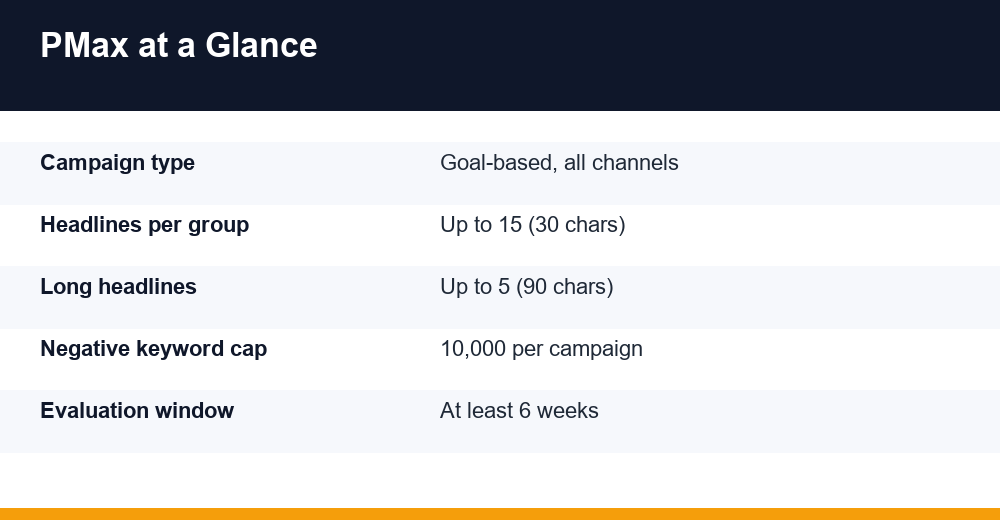
Performance Max (PMax) is a goal-based campaign type in Google Ads. You set a conversion goal, a budget and a bid strategy, upload creative assets, and Google’s machine learning assembles ads and decides where to show them across its inventory, all from one campaign.
Unlike a Search campaign, you do not bid on keywords. The system reads your landing pages, assets, product feed (if you have one) and the signals you provide, then predicts which users are most likely to convert. Google’s own help article, About Performance Max campaigns, positions it for advertisers with specific conversion goals who want to reach customers across all Google channels rather than one.
If you are still getting to grips with account structure, ad groups and conversion tracking, start with our guide to Google Ads for beginners before launching PMax. Everything below assumes the basics are already in place.
What PMax controls and what you control
- Google decides: channel mix, ad combinations, placements, query matching and bids within your chosen strategy.
- You decide: conversion goals and values, budget, bid target, assets, final URLs, audience signals, search themes, brand exclusions, negative keywords, and location and language targeting.
- Shared ground: final URL expansion, which you can switch off or limit with URL exclusions if you want traffic sent only to pages you choose.
The practical lesson is simple: performance max campaigns are only as good as the inputs and guardrails you give them. Weak conversion tracking or a vague goal is the most common reason they underperform, because the algorithm will faithfully optimise towards whatever you tell it counts as success.
Are Performance Max Campaigns Good for Small Budgets?
They can be, with conditions. PMax needs conversion data to learn. A campaign that spends a few dollars a day and records one or two conversions a month gives the algorithm very little to work with, and it tends to drift towards cheap, broad inventory such as Display placements.
A widely used practitioner rule of thumb is a daily budget of at least three times your target cost per acquisition. This is not an official Google threshold, and some specialists recommend more, but it is a sensible floor for collecting enough conversions to get through the learning period.
Signs a small account is ready for PMax
- Conversion tracking is verified and counts only meaningful actions (leads, purchases, booked calls), not page views or scroll events.
- The account already records a steady flow of conversions, ideally from an existing Search campaign.
- You have enough creative to fill an asset group: several images, a logo and ideally your own video.
- Your margins can absorb a few weeks of uneven results while the system learns.
When to wait
If you sell high-ticket B2B services with a long sales cycle and only a handful of leads per month, a tightly controlled Search campaign usually beats PMax. B2B advertisers comparing channels may also want to weigh LinkedIn Ads cost, since precise job-title targeting can justify higher click prices when lead volume is low.
Another option is to import offline conversions, such as qualified leads or closed deals from your CRM. Optimising towards a qualified lead rather than a raw form fill gives PMax a far cleaner signal, which matters more in small accounts than almost any creative tweak.
Building Asset Groups That Earn Their Spend
An asset group is a bundle of creative assets, a final URL and optional audience signals built around one theme. Think of it as the PMax equivalent of an ad group. Google mixes and matches the assets inside it to build ads for each channel and placement.
For a small account, start with one to three asset groups, each tied to a distinct product line, service or audience. Too many groups split limited budget and data, which slows learning and makes reporting harder to read.
| Asset | Length or ratio | Minimum | Maximum |
|---|---|---|---|
| Headlines | 30 characters | 3 | 15 |
| Long headlines | 90 characters | 1 | 5 |
| Descriptions | 90 characters (one up to 60) | 2 | 5 |
| Landscape image | 1.91:1 (1200 x 628 rec.) | 1 | 20 images in total |
| Square image | 1:1 (1200 x 1200 rec.) | 1 | 20 images in total |
| Square logo | 1:1 (1200 x 1200 rec.) | 1 | 5 |
| Business name | 25 characters | 1 | 1 |
Figures follow Google Ads Help asset specifications at the time of writing. Google recommends filling as many slots as you can with unique, distinct assets, and specs do change, so confirm limits in the interface before you build.
Asset group checklist
- Write headlines that each stand alone, because Google may show any one of them without the others.
- Include price, offer or proof points in at least two headlines.
- Keep key image content near the centre so it survives cropping on small screens.
- Upload your own video, including a vertical version. Without one, Google may auto-generate a video from your images, which rarely looks polished.
- Point each group at its most relevant landing page, not your homepage.
Check the asset strength indicator as you build, but do not treat it as a performance score. A group rated Excellent can still convert poorly if the landing page or offer is weak.
Audience Signals and Search Themes
Audience signals are hints, not targeting. They tell the algorithm where to start looking, and PMax is free to go beyond them once it finds converting users. Strong signals speed up learning, but they do not cap your reach.
Signals worth adding first
- Your data: customer lists and website visitors who converted. These are the strongest signals you can give.
- Custom segments: people who searched specific terms or browsed sites similar to the ones your buyers use.
- Interests and demographics: useful as supporting signals, weaker on their own.
Search themes
Search themes let you add query ideas directly to an asset group, similar to giving the system a short keyword brief. They guide matching but do not restrict it. Google has raised the allowance over time, with 2025 reports putting the cap at 50 themes per asset group, up from 25, so check your account for the current limit.
Use themes to cover queries your landing page does not explain clearly, such as service-area phrases or new product names. Search term insights can show whether traffic matched through your landing pages, your assets or your search themes, which tells you whether the themes are actually adding reach.
Can You Add Negative Keywords to Performance Max?
Yes. For years this was the biggest complaint about PMax, but Google now supports campaign-level negative keywords. During 2025 the limit was raised to 10,000 negative keywords per campaign. Negative keyword lists can also be applied, and account-level negatives carry over to PMax.
One limitation matters: negatives apply only to Search and Shopping inventory. They will not stop your ads appearing next to a YouTube video or on a Display site. For those placements, use account-level content and placement exclusions.
Brand exclusions
PMax readily serves on your own brand name because those clicks convert cheaply and inflate reported ROAS. If you already run a branded Search campaign, apply a brand exclusion list to the PMax campaign so it stops claiming those sales. Retailers can limit exclusions to Search inventory, which keeps branded Shopping traffic running if that is wanted.
Practitioners note that exclusions can be leaky, so review search term data monthly and add exact-match brand negatives if branded queries still slip through.
A starter negative list for small accounts
- Job seekers: jobs, careers, salary, hiring
- Free intent: free, template, DIY (if you sell a paid service)
- Research-only terms: definition, meaning, pdf, example
- Competitor brand names you do not want to pay for
- Locations you do not serve
How Long Does Performance Max Take to Learn?
The initial learning period typically runs one to two weeks, though it varies with conversion volume. Google’s guidance goes further, advising that you let a new campaign run for at least six weeks before judging it, so the system can gather enough data across channels and account for conversion delays.
During that window, avoid large or frequent changes. Significant edits to budget, bid target or conversion goals can push the campaign back into learning and make results harder to interpret.
| Change | Learning impact | Safer approach |
|---|---|---|
| Budget change over ~20% | Can restart learning | Adjust in small steps, a week apart |
| New bid target (tROAS/tCPA) | Can restart learning | Move the target 10-15% at a time |
| Adding an asset group | Moderate | Add once the first group is stable |
| Swapping a few assets | Low | Replace the weakest assets monthly |
| Changing conversion goals | High | Settle goals before launch |
The thresholds above are practitioner guidance rather than published Google rules, so treat them as approximate. Log every change with its date so you can match performance shifts to specific edits.
Reading Search Terms and Channel Reports
PMax used to be a black box. Reporting improved considerably during 2025, and small accounts should review it weekly once the learning period ends.
Reports to check
- Search terms: the actual queries that triggered ads, with clicks, cost and conversions. Use it to find negatives and new search themes.
- Search term insights: groups queries into categories so you can spot themes and gaps at a glance.
- Channel performance: splits delivery across Search, YouTube, Display, Discover, Gmail, Maps and Search Partners.
- Asset reporting: shows which headlines, images and videos drive results so you can replace weak ones.
- Audience insights: reveals the segments that convert, which you can reuse as signals.
What to act on
If channel reporting shows most spend going to Display with few conversions, the fix is usually upstream: tighten conversion goals, strengthen first-party audience signals and add proper video and image assets. If search terms show irrelevant queries, add negatives. If branded terms dominate, revisit brand exclusions.
Look at conversion value as well as conversion count. A channel that drives fewer conversions at a higher average order value may be doing more for profit than the headline numbers suggest.
Performance Max vs Search Campaigns: Which Is Better?
Neither wins in every case. Search gives you keyword-level control and clean data; PMax gives you reach and automation. Many small accounts get the best results by running both, with Search covering brand and core high-intent keywords while performance max campaigns explore new demand.
| Factor | Search campaign | Performance Max |
|---|---|---|
| Targeting | Keywords you choose | AI-led, guided by signals |
| Channels | Google Search (and partners) | All Google inventory |
| Control | High | Moderate |
| Reporting depth | Full keyword data | Improved, still aggregated |
| Creative needed | Text ads | Text, images, logo, video |
| Best for | Tight budgets, clear intent | Accounts with steady conversions |
When a user’s query is identical to an exact-match keyword in a Search campaign, Google prioritises the Search campaign over PMax. That makes a well-built Search campaign a reliable way to protect your most valuable queries.
If you are still deciding between Google and social platforms altogether, our comparison of Google Ads vs Facebook Ads covers intent, cost and creative differences in more depth.
9 Tips to Improve Performance Max Campaigns ROAS
These steps reflect what consistently moves results for smaller performance max campaigns. Work through them in order before blaming the algorithm.
- Fix conversion tracking first. Count only primary actions and assign realistic values so value-based bidding has something to optimise.
- Start with Maximize conversions or Maximize conversion value without a target, then add tCPA or tROAS once you have a few weeks of data.
- Keep asset groups few and focused, one per product line or service.
- Lead with first-party audience signals, such as customer lists and past converters.
- Apply brand exclusions if a branded Search campaign exists, so reported ROAS reflects new customers.
- Build a negative keyword list before launch and expand it from the search terms report.
- Turn off final URL expansion or exclude irrelevant pages (blog, careers, login) if traffic lands in the wrong places.
- Upload real video, including vertical formats, to avoid auto-generated clips.
- Wait at least six weeks before major judgments, and make changes gradually.
Review asset and channel reports monthly, retire the weakest assets, and keep notes on every change. Small, steady adjustments outperform constant restructuring, and well-managed performance max campaigns tend to improve with each month of clean data.
Frequently Asked Questions
What is a Performance Max campaign?
Performance Max is a goal-based Google Ads campaign type that serves ads across Search, Shopping, YouTube, Display, Discover, Gmail and Maps from one campaign. You supply conversion goals, budget, creative assets and audience signals, and Google’s AI chooses placements, combines assets and sets bids to find conversions within your bid strategy.
Is Performance Max good for small budgets?
It can work, but only when conversion tracking is solid and the account already generates steady conversions. Practitioners often suggest a daily budget of at least three times your target CPA as an unofficial floor. With very few monthly conversions, a tightly controlled Search campaign usually delivers better results.
Can you add negative keywords to Performance Max?
Yes. Google now supports campaign-level negative keywords in PMax, with the limit raised to 10,000 per campaign during 2025. You can also use negative keyword lists and account-level negatives. They apply only to Search and Shopping inventory, not to YouTube or Display placements.
How long does Performance Max take to learn?
The initial learning period usually lasts around one to two weeks, depending on conversion volume. Google advises letting a new campaign run for at least six weeks before evaluating it. Avoid large budget, bid target or goal changes during that time, as they can restart learning and blur your results.