The fastest way to get more return from every article you publish is to repurpose blog content for social media using a fixed system rather than one-off ideas. This guide maps each part of a typical blog post to a specific platform format, then gives you a workflow and a calendar pattern your team can run every week. No guesswork, no starting from a blank caption.
Table of Contents
Why Repurpose Blog Content for Social Media
A solid blog post already contains the hard parts of social content: research, a point of view, examples and data. Writing it took hours. Publishing it once and sharing a single link wastes most of that effort.
When you repurpose blog content for social media, you are not copying and pasting. You are reshaping ideas so they fit how people actually use each platform: swiping on Instagram, skimming on LinkedIn, watching on TikTok and YouTube Shorts, reading in an inbox.
There are three practical payoffs:
- Consistency without burnout. One article can feed your channels for two to three weeks.
- Message reinforcement. Most followers will never see a single post. Repeating a core idea in different formats increases the odds they absorb it.
- Better feedback. Social engagement tells you which sub-topics deserve their own full article next.
There is also a quieter benefit: repurposing forces you to find the single sharpest idea in each section. If a step cannot stand alone as a slide or a short clip, it is often too vague in the article as well, so the exercise improves your writing over time.
Repurposing works best when it sits inside a wider content marketing strategy, so every post points toward the same audience goals instead of chasing random reach.
What Content Should You Repurpose First?
Not every post deserves a second life. Start with articles that have already proved themselves, then work outward. A simple scoring pass across your archive takes about an hour and saves weeks of effort on weak material.
Signals that a post is worth repurposing
- Organic traffic: posts that already rank or pull steady visits from search show the topic has demand.
- Evergreen value: how-to guides, frameworks and checklists stay useful for months, unlike news reactions.
- Structure: numbered steps, comparisons and lists break apart cleanly into slides and clips.
- Original data or opinions: anything your competitors cannot copy makes stronger social posts than generic tips.
- Sales relevance: topics close to what you sell earn attention that can turn into enquiries.
A quick scoring method
Give each candidate article a score from 0 to 2 on the five signals above, for a maximum of 10. Anything scoring 7 or higher goes straight into the queue. Posts scoring 4 to 6 get refreshed first, and anything lower is usually better rewritten than repurposed.
Avoid repurposing posts with outdated statistics or old product screenshots until you refresh the article itself. Sending social traffic to a stale page undermines trust quickly.
A good tie-breaker: pick your top five posts by traffic, then your top five by conversions. Whatever appears on both lists goes first.
Map Each Blog Section to a Platform Format
Most generic guides list formats. The more useful move is to look at the anatomy of your article and assign each part a destination. Almost every well-structured post has the same building blocks, and each block suits a different channel.
| Blog section | Best social format | Platforms | Notes |
|---|---|---|---|
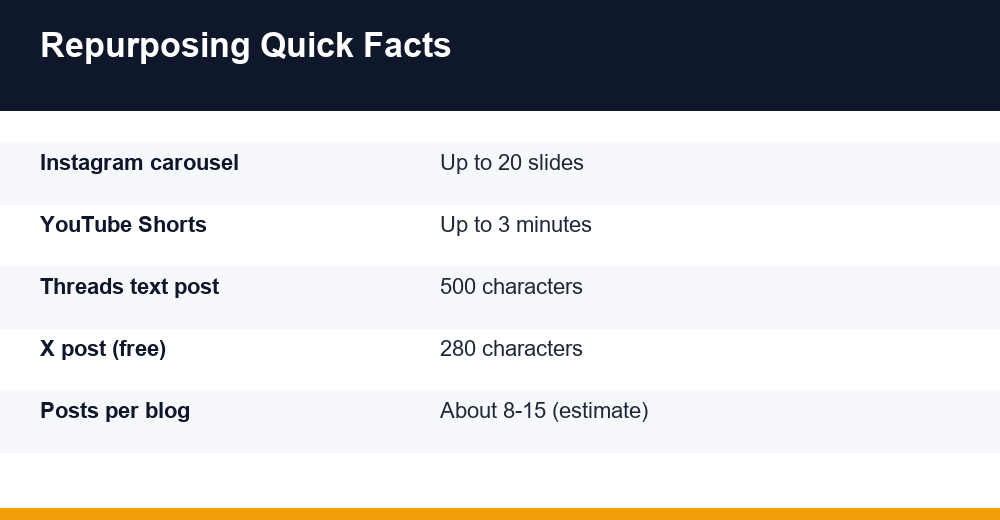
| Headline and hook | Text post or short opinion | LinkedIn, Threads, X | Keep the tension; free X posts cap at 280 characters, Threads posts at 500 |
| Numbered steps or list | Carousel / document post | Instagram, LinkedIn | Instagram carousels allow up to 20 slides; 6-10 usually reads better |
| Key statistic or data point | Single graphic or chart | Instagram, LinkedIn, Facebook | Cite the source on the graphic itself |
| How-to process | Short vertical video | TikTok, Reels, YouTube Shorts | Shorts can run up to 3 minutes, but shorter clips are easier to finish |
| Expert quote or opinion | Quote card or talking-head clip | Instagram, LinkedIn | Tag the person quoted when possible |
| Common mistakes section | Thread | X, Threads | One mistake per post in the thread |
| FAQ section | Poll or Q&A post | LinkedIn, Instagram Stories | Use the question as the hook |
| Full argument and conclusion | Newsletter feature | Summarise, add context, link to the full post |
Platform limits change often, so check each network’s current specs before you build templates. The limits above were accurate at the time of writing.
Match the tone, not just the format
The same idea needs a different voice on each channel. LinkedIn rewards first-person lessons and clear takeaways. Threads and X favour short, opinionated lines. Short video works when you show rather than explain, and email can carry more nuance because readers chose to be there.
Write a one-line tone note for each platform in your style guide. It stops a carousel from reading like a press release and a thread from reading like a textbook.
8 Ways to Turn One Blog Post Into Social Posts
So how do you repurpose a blog post for social media in practice? Break it into parts, give each part a format, then rewrite it for the platform. Here is how that plays out using the map above. Treat these as templates you fill in, not as inspiration.
1. The carousel from your steps
Take each step of your how-to section and give it one slide: a short headline, one supporting line, nothing more. Slide one states the outcome, the final slide tells people where to read the full version. On LinkedIn, upload the same design as a PDF document post.
2. The thread from your mistakes or tips
Lists of errors or tips translate well into threads on X and Threads. Open with the most surprising point, number each post, and keep the article link for the final reply rather than the first post.
3. Short vertical videos from your process
Pick one step that is easier to show than describe and film it in under a minute. For small teams, our guide to TikTok marketing for small businesses covers hooks and posting rhythm that carry over to Reels and Shorts too.
4. Data graphics from your statistics
One number, one sentence of context, one source line. Data graphics get saved and shared because they are easy to reference later. Only use figures you can trace to a named source.
5. Quote cards from your strongest lines
Scan your draft for sentences that make a claim on their own. Those become quote cards or text-only posts. If you cannot find any, the original article probably needs a sharper point of view.
6. Polls from your FAQ section
Turn a question from your FAQ into a poll with three or four options. Share the answer the next day with a link to the article. That gives you two posts and a reason for people to come back.
7. A LinkedIn text post from your opinion
Rewrite your intro and conclusion as a first-person story: what you saw, what you learned, what you recommend. On LinkedIn, personal framing usually lands better than a neutral summary.
8. A newsletter section from the full piece
Email subscribers already trust you, so give them the context social posts cannot: why you wrote it, the one takeaway that matters most, and a link. Keep it to 150-250 words.
You will rarely use all eight for every article. A short opinion piece might only support ways 5, 7 and 8, while a detailed tutorial can feed every format on the list.
A Repeatable Workflow You Can Run Weekly
Knowing how to repurpose blog content for social media is one thing; doing it every week without it eating your calendar is another. This seven-step workflow takes roughly two to four hours per article once templates exist (an estimate that varies with team size and how much video you produce).
- Extract. Read the published article and highlight hooks, steps, stats, quotes and questions. Paste them into one working document.
- Assign. Next to each extract, write its destination format using the section-to-format map.
- Rewrite natively. Draft each piece for its platform: shorter sentences for threads, one idea per slide for carousels, spoken language for video scripts.
- Design in batches. Build all carousels and graphics in one session using saved templates to keep the look consistent.
- Record in batches. Film all short videos for the article back to back, then edit them together.
- Add tracking. Use UTM parameters on every link so you can see in analytics which format sent visitors.
- Schedule and review. Load everything into your scheduler, then review results after two weeks and note what to repeat.
What to measure after two weeks
- Saves and shares per format, which show what people found worth keeping.
- Clicks to the original article from each tagged link.
- Comments that raise new questions you could answer in a follow-up post.
- Newsletter click-through compared with your usual average.
Keep a shared checklist with these steps so any team member can pick up an article and run the process. Consistency is what turns repurposing from a nice idea into a reliable channel.
How Many Posts From One Blog, and When to Publish
A typical 1,500-2,500 word article realistically yields about 8 to 15 distinct social posts, depending on how many steps, stats and opinions it contains. That is an approximate working range from practice, not a fixed rule. Short opinion pieces may give you four; detailed pillar guides can give you twenty.
The mistake most teams make is publishing everything in the first two days. Spread the pieces out so the article keeps getting traffic for weeks. A sample slotting pattern:
| Timing | Post | Channel |
|---|---|---|
| Day 1 | Launch post with hook and link | LinkedIn, X, Threads |
| Day 2 | Newsletter feature | |
| Day 3 | Carousel of main steps | Instagram, LinkedIn |
| Day 5 | Short video on one step | TikTok, Reels, Shorts |
| Day 8 | Data graphic | Instagram, LinkedIn |
| Day 10 | Thread of mistakes | X, Threads |
| Day 12 | Poll from FAQ | LinkedIn, Stories |
| Day 15-21 | Quote cards and second video | All visual channels |
| Month 3+ | Refreshed reshare | Best-performing channel |
Slot these into your content calendar alongside new articles so one week is not overloaded with the same topic. Interleaving two or three articles at different stages keeps feeds varied.
If you publish one new article a week, this pattern means each week’s feed mixes a launch, mid-cycle carousels and videos, and late-cycle quote cards from older posts. That rhythm is the real advantage when you repurpose blog content for social media consistently.
Is Repurposing Content Bad for SEO?
No. Turning an article into carousels, threads and videos does not hurt your rankings. Social posts are short, reworked formats on other platforms, so they do not compete with your page the way a copied article would.
The real risk is full-text republishing, for example pasting the whole article onto Medium, LinkedIn articles or a partner site. Google’s guidance on fixing canonicalization issues notes that when partners syndicate your content, the most effective solution is for them to block indexing of their copy, and that the canonical link element is not recommended for that situation.
Practical rules to stay safe:
- Publish on your own site first and let it get indexed before posting long excerpts elsewhere.
- Use summaries and excerpts on social platforms rather than the full text.
- If you syndicate a complete article, ask the partner to noindex it and link back to the original.
- Keep updating the original article; refreshed pages give you reasons to share again.
Done this way, repurposing tends to support search rather than harm it: more people discover the article, and some of them link to it or search for your brand later.
Tools That Help You Repurpose Content
You do not need a large stack. Most teams cover the workflow with one tool per job:
| Job | Tool type | What to look for |
|---|---|---|
| Extracting ideas | Docs or notes app, AI assistant | Fast summarising, easy sharing |
| Designing carousels and graphics | Template-based design tool | Brand kits, multi-page PDF export |
| Editing short video | Mobile or desktop video editor | Auto captions, vertical presets |
| Scheduling | Social media scheduler | Multi-platform queues, analytics |
| Newsletter platform | Templates, link tracking | |
| Measuring | Web analytics with UTMs | Channel and campaign reports |
AI writing assistants are useful for a first pass at extracting hooks or shortening paragraphs. Always edit the output so it sounds like your brand, and check every fact against the original article.
The most valuable tool is still a reusable template library: carousel layouts, thread openers and video intros you can fill in every week. That is what lets you repurpose blog content for social media week after week, whichever apps you choose.
Frequently Asked Questions
How do you repurpose a blog post for social media?
Break the article into its parts: hook, steps, statistics, quotes and FAQs. Assign each part a format, such as a carousel for steps, a thread for tips, a graphic for data and a short video for a process. Rewrite each piece natively for its platform, design in batches, and schedule posts over two to three weeks.
How many social posts can you get from one blog post?
A detailed article usually yields about 8 to 15 distinct social posts, though this is an approximate range. Short opinion pieces may give only a handful, while long pillar guides with many steps, data points and quotes can produce twenty or more across carousels, threads, videos, polls and newsletter features.
Is repurposing content bad for SEO?
Reworking an article into social posts, videos or carousels does not harm SEO. Problems only arise when the full text is republished elsewhere. In that case, publish on your own site first and ask syndication partners to block indexing of their copy and link back to the original, as Google recommends.
What tools help repurpose content?
Most teams need a notes app or AI assistant to extract ideas, a template-based design tool for carousels and graphics, a video editor with auto captions, a social media scheduler, a newsletter platform and web analytics with UTM tracking. A library of reusable templates matters more than any single paid tool.