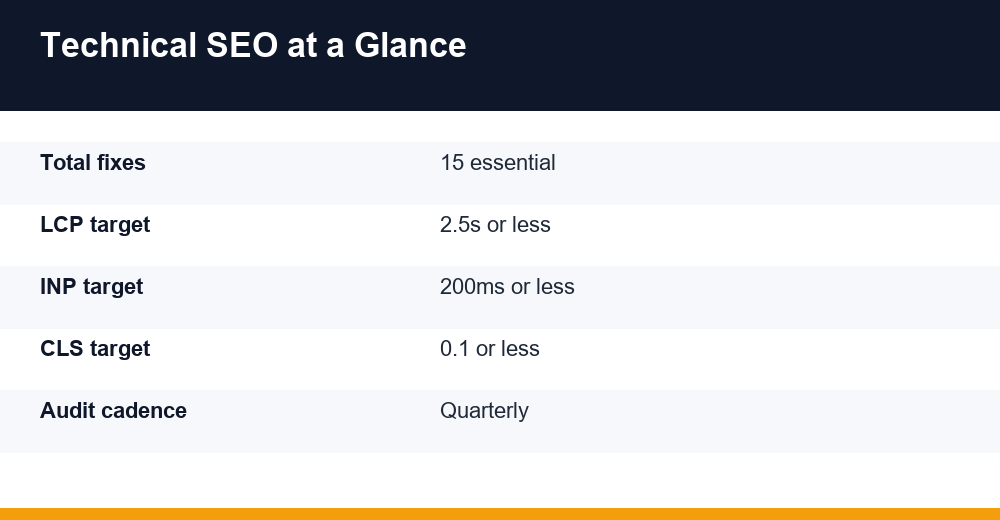
Technical SEO is the work that lets search engines and AI answer engines crawl, render, and index your site before your content or backlinks can earn a single ranking. Most sites lose traffic not because their writing is weak, but because a robots rule, a slow template, or a broken redirect quietly keeps pages from ever competing. This guide walks through 15 concrete fixes for 2026, each with a plain reason it matters and a way to check it yourself.
Table of Contents
Why Technical SEO Still Matters in 2026
Google, Bing, and the newer wave of answer engines all begin the same way. A crawler requests your URL, a renderer builds the page, and an index decides whether it deserves to appear. If any step fails, nothing downstream helps. That is the quiet power of the technical layer: it either opens the door or keeps it shut.
The stakes are higher now for two reasons. AI-driven results pull from clean, machine-readable pages, so blocked resources and messy markup can cost you visibility in answers you never even see. And Google’s field-data metrics reward the experience of real visitors, not a lab score you can stage once and forget.
It helps to keep three distinct gates in mind, because most site problems are really a failure at one of them:
- Crawlability — can a bot physically reach the URL?
- Indexability — are you allowing and inviting that page into the index?
- Experience — does the page load fast and stay stable for real users?
Rendering sits quietly between crawling and indexing, and it trips up more sites than people expect. If your content only appears after JavaScript runs, a crawler that times out or hits a blocked script may index a nearly empty page. Test how Googlebot actually sees a URL with the URL Inspection tool in Search Console, then compare it against what loads in your own browser.
A strong technical SEO foundation makes every other investment work harder. Before you pour budget into content, it pays to read our complete SEO guide for 2026 so your on-page and link-building work lands on a site that can actually be found.
Fixes 1-4: Crawlability, Robots and Indexation
Crawlability and indexation are separate ideas that people constantly blur. Crawlability means a bot can reach the page; indexability means you are allowing and encouraging that page into the search index. You need both, and each has its own controls that fail in different ways.
Fix 1: Audit your robots.txt
Your robots.txt file tells crawlers where they may go, and a single stray Disallow line can wall off an entire section. Confirm you are not blocking CSS or JavaScript files, since Google needs them to render the page the way a visitor sees it. Check that the file returns a 200 status and points to your sitemap.
Fix 2: Keep a clean XML sitemap
An XML sitemap is a curated list of the URLs you actually want indexed. Include only canonical, indexable, 200-status pages — no redirects, no noindex pages, no 404s. Submit it in Search Console and regenerate it automatically. On large sites, split it into logical files, each under the 50,000-URL limit, so errors are easier to isolate.
Fix 3: Control indexation deliberately
Use a meta robots tag or an X-Robots-Tag header to keep thin, duplicate, or private pages out of the index. Never mix signals: a page blocked in robots.txt cannot be crawled, so Google may never see its noindex directive and can index it anyway from external links. Reserve noindex for pages you genuinely want hidden.
Fix 4: Watch crawl budget on large sites
Crawl budget only becomes a real concern once you pass tens of thousands of URLs, but on big stores and publishers it matters. Trim faceted-navigation traps, kill infinite calendars, and remove redirect chains so bots spend their limited visits on pages that earn revenue. If your site is small, you can safely ignore this one.
Server log files show what bots actually do, not what you assume. Analyze them to see which URLs Googlebot requests most, where it wastes visits on parameters or redirects, and which important pages it rarely touches. Even a one-week sample from your access logs can reveal crawl waste that no third-party crawler will surface on its own.
Fixes 5-7: Site Speed and Core Web Vitals
Speed is both a ranking factor and a conversion factor. Google measures it through Core Web Vitals, using field data from real Chrome users at the 75th percentile rather than a single lab test. The metric set changed recently, so make sure you are optimizing the current three, not an outdated list.
| Metric | What it measures | Good in 2026 |
|---|---|---|
| LCP (Largest Contentful Paint) | Loading of the main content | 2.5s or less |
| INP (Interaction to Next Paint) | Responsiveness to input | 200ms or less |
| CLS (Cumulative Layout Shift) | Visual stability while loading | 0.1 or less |
Fix 5: Hit the Core Web Vitals thresholds
INP replaced First Input Delay (FID) as an official Core Web Vital in March 2024, so any checklist still citing FID is out of date. Track all three metrics in PageSpeed Insights and the field data inside Search Console. See Google’s Core Web Vitals documentation for the current thresholds and how they are collected.
Fix 6: Cut render-blocking weight
Most slow pages are simply too heavy. Compress and serve images as WebP or AVIF, lazy-load anything below the fold, and defer non-critical JavaScript so the main content paints first. A content delivery network shortens the distance between your server and the visitor, which usually improves loading times more than any single code tweak.
Fix 7: Reserve space to stop layout shift
Layout shift happens when elements load without reserved space and shove the page around as the reader tries to click. Set explicit width and height on images, videos, and ad slots, and preload key web fonts to avoid a late swap. Small habits here protect your CLS score and stop frustrating misclicks.
Server response time underlies all three metrics. A slow Time to First Byte (TTFB) delays everything that follows, so check your hosting, database queries, and caching before you blame the front end. Solid caching, a modern hosting stack, and a CDN often move your scores more than shaving a few kilobytes off a single script.
Fixes 8-9: Mobile-First Indexing and HTTPS
Two foundations are non-negotiable in 2026: the page has to work on a phone, and it has to be served securely. Both are baseline expectations rather than advantages, which means failing either one holds you back more than passing them pushes you forward.
Fix 8: Pass mobile-first indexing
Google now indexes the mobile version of your site, so the mobile experience is the version that ranks. Ensure full parity: the same content, headings, structured data, and meta tags on mobile and desktop. Use responsive design, tap targets large enough for a thumb, readable font sizes, and avoid intrusive interstitials that cover the content on arrival.
Google retired the dedicated Mobile Usability report and Mobile-Friendly Test in late 2023, so you now verify mobile readiness with Lighthouse, your browser’s responsive mode, and real devices. Load your top templates on a mid-range phone over a throttled connection, then confirm nothing important is hidden, cramped, or dependent on hover to work.
Fix 9: Enforce HTTPS everywhere
A valid TLS certificate is a lightweight ranking signal and a trust signal for visitors. Redirect every HTTP request to HTTPS in a single hop, fix mixed-content warnings where a secure page still pulls an insecure image or script, and add an HSTS header so browsers default to the secure version from the first visit onward.
Fixes 10-12: Structured Data and Canonicals
This group is about helping machines understand and consolidate your pages. Structured data explains what a page is, while canonical tags decide which version of near-identical pages should collect the ranking value. Both are easy to get subtly wrong.
Fix 10: Add structured data that earns rich results
Use JSON-LD schema and make sure it describes content the visitor can actually see. Focus on types that still trigger rich results in 2026 — Article, Product, Review, Breadcrumb, Organization, and LocalBusiness. Note that Google has narrowed FAQ and HowTo rich results, so add those for clarity, not for guaranteed listings. Validate everything with the Rich Results Test.
Keep your markup honest. Structured data must reflect content the user can see, or you risk a manual action for spammy markup and the loss of every rich result on your site. Do not mark up reviews you invented, prices you do not display, or FAQs that never appear on the page. Accurate schema is the only kind worth shipping.
Fix 11: Get canonical tags right
Every page should carry a self-referencing canonical, and duplicate or parameter versions should point to the single master URL. Never canonicalize to a page that is noindexed or redirected, and never place more than one canonical tag on a page. Conflicting canonicals are one of the most common reasons the wrong URL ends up ranking.
Fix 12: Consolidate duplicate content
Decide on one canonical form and enforce it everywhere: HTTP or HTTPS, www or non-www, trailing slash or not, uppercase or lowercase. Handle URL parameters from filters and tracking so they do not spawn thousands of near-identical pages, and make sure paginated series are crawlable without creating duplicates of your first page.
Fixes 13-15: Broken Links and Redirects
The final group protects the equity you have already built. Dead links and sloppy redirects waste crawl budget, leak authority, and quietly frustrate visitors who hit a wall instead of the page they wanted.
Fix 13: Fix broken links and 404s
Crawl your site for 4xx and 5xx errors and resolve them at the source. Repair or redirect broken internal links, replace dead external links, and design a helpful custom 404 that guides people back into the site. Broken links inside your own navigation are the most damaging, because they stop crawlers from reaching real pages.
Fix 14: Clean up redirects
Use a 301 for anything moved permanently, and avoid redirect chains and loops that slow crawling and dilute signals. When you migrate or redesign, map old URLs to their closest new equivalents one-to-one, and update internal links to point straight at the final destination instead of hopping through an old redirect.
Fix 15: Strengthen internal linking
Internal links spread authority and tell search engines which pages matter most. Use descriptive, keyword-aware anchor text, link from strong pages down to deeper ones that need help, and keep important pages within a few clicks of the homepage. Breadcrumbs reinforce that hierarchy for both users and crawlers.
The 15-Fix Technical SEO Checklist
Use this technical SEO checklist as your working order. It maps each fix to the tool that surfaces it and the reason it matters, so you can move from highest impact to lowest instead of guessing where to start.
| Fix | Area | Check with | Priority |
|---|---|---|---|
| 1. Robots.txt | Crawlability | Search Console, manual review | High |
| 2. XML sitemap | Indexation | Search Console | High |
| 3. Indexation control | Indexation | Site search, crawler | High |
| 4. Crawl budget | Crawlability | Server log files | Low (small sites) |
| 5. Core Web Vitals | Speed | PageSpeed Insights, CrUX | High |
| 6. Render-blocking assets | Speed | Lighthouse | Medium |
| 7. Layout stability | Speed | PageSpeed Insights | Medium |
| 8. Mobile-first | Mobile | Lighthouse, real devices | High |
| 9. HTTPS | Security | Browser, SSL check | High |
| 10. Structured data | Rich results | Rich Results Test | Medium |
| 11. Canonicals | Duplication | Site crawler | High |
| 12. Duplicate content | Duplication | Site crawler | Medium |
| 13. Broken links | Links | Site crawler | Medium |
| 14. Redirects | Links | Site crawler | Medium |
| 15. Internal linking | Architecture | Site crawler | Medium |
If you are short on time, work through the fixes in this order:
- Remove anything blocking crawl or index first (Fixes 1-3, 8, 9).
- Fix speed and stability for real users next (Fixes 5-7).
- Tidy duplication and canonical signals (Fixes 11-12).
- Polish links, redirects, and schema last (Fixes 10, 13-15).
This work is never a one-time project. Sites drift as teams ship features, migrate platforms, and add plugins, so build these checks into your release process instead of treating them as an annual chore. Re-crawl after every major deploy, watch Search Console for new errors, and keep a short baseline of your key metrics so regressions surface within days, not quarters.
With the foundation stable, aim your new crawl efficiency at pages built on real demand. Pair this cleanup with disciplined keyword research so every page you invite into the index has a genuine job to do.
Frequently Asked Questions
What is technical SEO in simple terms?
Technical SEO is everything that helps search engines and AI systems crawl, render, and index your site — things like site speed, robots.txt, sitemaps, HTTPS, structured data, and clean redirects. It does not create content; it makes sure the content you already have can actually be found and ranked.
How often should I run a technical audit?
Run a full audit at least quarterly, plus a lighter monthly check if you publish often or manage a large site. Always audit before and after a migration, redesign, or platform change, since those events break redirects, canonicals, and indexation more than anything else.
Do Core Web Vitals really affect rankings?
Yes, but modestly. Core Web Vitals are a genuine ranking signal and act as a tie-breaker between similar pages. Their bigger payoff is user experience: faster, more stable pages convert better and hold visitors longer, which supports rankings across the board over time.
Can I do technical SEO without a developer?
Many fixes — sitemaps, meta robots, image compression, redirects, and schema plugins — are manageable on platforms like WordPress or Shopify. Deeper work on rendering, server response, and crawl budget usually needs a developer. Start with the high-impact items you can control today, then delegate the rest.