A welcome email sequence is the set of automated emails a new subscriber receives in the first days after joining your list, and it is usually the most engaged mail you will ever send. This guide gives you a ready-to-adapt five-email blueprint with timing, one clear goal per email and subject lines for both service businesses and online stores. It also settles the how-many-emails question with what published benchmark data actually shows.
Table of Contents
Why a Welcome Email Sequence Beats a Single Email
A new subscriber has just raised their hand. They remember your brand, they are curious about what they signed up for, and they are checking their inbox for the guide or discount you promised. That attention fades quickly, usually within days.
A single welcome message tries to do everything at once: deliver the incentive, tell your story, show your best work and ask for a sale. The result is a long, unfocused email that does none of those jobs well. Splitting the work across several short messages lets each one earn a single action.
There is also a trust argument. Every email that gets opened and clicked in the first week teaches mailbox providers that people want your mail. That early engagement history supports inbox placement for every campaign you send afterwards.
- Higher attention: welcome messages typically post some of the highest open and click rates of any email type in published benchmarks.
- Faster first conversion: a series gives subscribers several low-pressure chances to buy or book while interest is fresh.
- Better data: clicks on different topics tell you what each person cares about, so you can segment them before regular campaigns start.
- Lower churn later: people who understand what you send and how often are less likely to unsubscribe or hit the spam button.
If your list is still small, the series matters even more, because each new contact is precious. Pair it with the tactics in our guide to building an email list from scratch so every signup flows straight into the automation.
How Many Emails Should a Welcome Series Have?
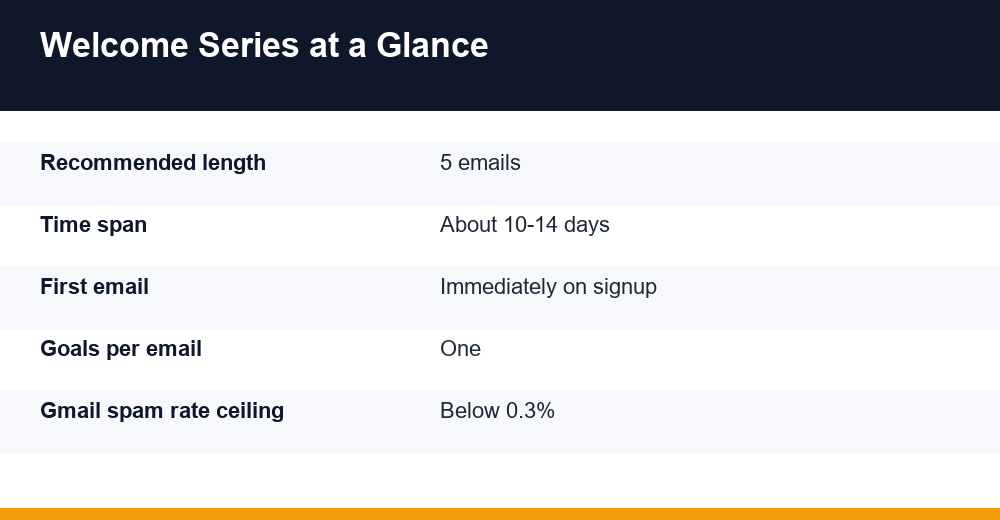
Short answer: three to five emails covers the vast majority of businesses, and five is the most practical default for anyone with something to explain before a first purchase or booking. Going much beyond six rarely adds value unless each extra email has a distinct job.
The data is less tidy than many blog posts suggest. Email platforms and practitioner guides commonly recommend three to six messages spread over one to two weeks, and ecommerce brands often see most welcome revenue come from the first few emails. Nobody has published a universal number, because the right length depends on how long your buying decision takes.
| Series length | Best fit | Main risk |
|---|---|---|
| 1 email | Very simple offers, newsletters with no product | Leaves conversion and education on the table |
| 3 emails | Ecommerce with low-priced, impulse products | Little room to handle objections |
| 5 emails | Most service firms and mid-ticket stores | Needs a clear goal per email to avoid repetition |
| 7+ emails | Complex B2B services, courses, software | Fatigue and unsubscribes if content is thin |
A useful rule: add an email only when you can name the single action it should trigger. If two drafts share the same goal, merge them. If a step in your sales conversation is missing (proof, objections, the offer), add one.
Let your own numbers decide. Watch click and unsubscribe rates on each message: if email four still earns healthy clicks, the series is not too long, and if unsubscribes spike at one step, that email is mistimed or off-message.
The 5-Email Welcome Email Sequence Blueprint
The structure below works for both service businesses and online stores. Each email has one goal, one main call to action and a clear reason to exist. Treat the days as starting points rather than fixed rules.
| Send | Single goal | Primary CTA | |
|---|---|---|---|
| 1. Welcome and deliver | Immediately | Deliver the promise, set expectations | Download, claim code or reply |
| 2. Your story | Day 2 | Build connection and relevance | Read the story or about page |
| 3. Best value | Day 4 | Show your most useful content or product | Open the top guide or bestsellers |
| 4. Proof | Day 7 | Remove doubt with results and reviews | View case study or reviews |
| 5. The offer | Day 10-12 | Convert to first purchase or call | Buy now or book a consultation |
Email 1: Welcome and deliver the promise
Send the incentive in the first line, not the last. Then tell people what they will receive, how often, and what makes it worth opening. Ask them to reply with one sentence about what they need help with; replies are a strong positive signal and give you free research.
Email 2: The story behind the business
Explain why you exist and who you help, in under 200 words. For a service firm this might be the problem the founder kept seeing at clients. For a store, it could be how products are sourced or made. Keep it about the reader’s problem, not your company history.
Email 3: Your most valuable resource
Point to the single piece of content, tool or product category that delivers the quickest win. Agencies might share a checklist or audit template; stores often feature bestsellers or a short buying guide. Resist listing ten links. One strong pick wins.
Email 4: Proof that it works
Share a short case study, before-and-after result or a handful of genuine customer reviews. Specific numbers from real clients beat generic praise. Only use testimonials you have permission to publish, and never invent results.
Email 5: A clear, time-bound offer
Now ask directly. Service businesses invite a call or a fixed-price starter package; stores remind subscribers about the welcome discount and when it expires. Add a short answer to the most common objection, such as pricing, shipping or contract length, right above the button.
What Every Welcome Email Should Include
Beyond the goal of each message, a few elements belong in every email in the series. They make the emails easier to act on and keep you on the right side of mailbox rules and law.
- A recognisable sender name: use the brand or a real person plus brand, and keep it identical across the series.
- One primary call to action: a single button repeated once as a text link for long emails.
- Scannable copy: short paragraphs, a clear headline and mobile-friendly layout.
- Expectation setting: what you send and how often, stated plainly in the first email.
- Personalisation that matters: first name is fine, but references to the signup source or chosen interest work harder.
- A visible unsubscribe link and your postal address: required for commercial email under the US CAN-SPAM Act, and expected everywhere else.
Avoid image-only designs, competing offers and link-stuffed footers. Each extra choice dilutes the one action you want.
Finally, ask for a small commitment early. A reply, a preference click or adding your address to contacts all help future emails land in the main inbox rather than a promotions or spam folder.
When to Send Each Welcome Email
The first message should go out immediately after signup or double opt-in confirmation. The subscriber is still on your site or in their inbox, and a delay of even a few hours lets other brands and notifications push you down.
After that, spacing depends on how quickly your customers decide. A common pattern sends the second email the next day or two days later, then stretches the gaps as the series goes on.
- Email 1: instantly, triggered by the signup event.
- Email 2: one to two days later, while the brand is still familiar.
- Email 3: around day four.
- Email 4: around day seven.
- Email 5: day ten to fourteen, timed so a welcome discount expiry lands near the end.
Two automation settings are worth checking. First, add an exit condition so anyone who buys or books mid-series stops receiving sales emails and moves into a customer onboarding flow instead. Second, hold regular newsletters until the series finishes, or you will double-mail your newest and most fragile contacts.
For send time of day, there is no universal winner. Test two windows, for example morning versus early evening in the subscriber’s time zone, and keep whichever produces more clicks rather than opens.
How to Write Welcome Email Subject Lines
Good welcome subject lines are clear before they are clever. The subscriber should recognise who sent the email and what is inside within a glance. Aim for roughly 30 to 50 characters so the line is not cut off on most phones, and use the preview text to finish the thought.
- Name the promise: mention the guide, code or resource they asked for.
- Match the goal: the subject should describe the single action of that email.
- Be specific: numbers and concrete outcomes beat vague hype.
- Skip spam triggers: avoid all caps, strings of exclamation marks and misleading “Re:” or “Fwd:” prefixes, which also conflict with FTC guidance on deceptive subject lines.
| Service business example | Ecommerce example | |
|---|---|---|
| 1. Welcome | Your SEO audit checklist is inside | Welcome in: here is your 10% code |
| 2. Story | Why we stopped selling retainers | How one bad mug started our brand |
| 3. Value | The 15-minute fix most sites miss | Our three bestsellers, explained |
| 4. Proof | How a local clinic doubled leads | 4.8 stars from 2,000 customers: why |
| 5. Offer | Book a free 20-minute strategy call | Your welcome code expires Sunday |
The figures in the examples are placeholders. Swap in your own verified numbers, and never claim review counts or results you cannot back up.
Test one variable at a time. Subject line A/B tests on the first email give you results quickly because it goes to every new subscriber, but judge winners on clicks or conversions, not opens alone.
Welcome Email Open Rates and Realistic Benchmarks
Welcome emails outperform regular campaigns on almost every metric, but the exact figures vary widely depending on who measures and how. Published welcome open rates range from roughly 35% to well above 60%, depending on the platform, the industry mix in the sample and how opens are counted.
Treat any open rate with caution. Apple Mail Privacy Protection preloads images, which can register an open even when nobody reads the message. That inflates open rates across the industry and makes them a weak basis for decisions.
| Metric | What published data suggests | How to use it |
|---|---|---|
| Open rate | Often 50% or more (inflated by Apple MPP) | Spot sudden drops that hint at deliverability issues |
| Click rate | Usually several times your campaign average | Main signal of interest per email |
| Conversion rate | Varies with price point and offer | Core success metric: orders or booked calls |
| Revenue per recipient | Varies widely by store; track your own | Compare flows and justify investment |
| Unsubscribe rate | Should stay low; investigate spikes | Flags mistimed or off-target emails |
Most published welcome benchmarks come from ecommerce brands on platforms such as Klaviyo or Mailchimp, so service businesses should treat them as directional only. A better comparison is your own baseline: welcome emails versus your regular campaigns on the same platform over the same period.
For a fuller view of what email can return across the funnel, see our breakdown of how to measure email marketing ROI, which covers attribution windows and revenue per subscriber.
Adapting the Series for Services and Ecommerce
The five-step skeleton stays the same, but what you put inside each email changes with the business model. The biggest difference is the conversion event: a booked call versus a completed checkout.
Service businesses and agencies
Buyers of services need to trust your judgement before they spend money, so your welcome email sequence should lean on expertise and proof. Swap product photos for frameworks, checklists and short client stories with measurable outcomes.
- Use a low-commitment offer in email five: a short audit, a strategy call or a fixed-price starter project.
- Send from a named person rather than a generic brand address; replies often turn into conversations.
- Stretch timing to about two weeks if your sales cycle is long, or add a sixth email answering objections.
Ecommerce stores
Shoppers often arrive through a discount popup, so the first email must deliver the code instantly and make it easy to use. Product discovery, social proof and urgency carry more weight than long stories.
- Show bestsellers and categories in email three, ideally based on the signup source.
- Use reviews and user photos you have rights to in email four.
- Set a genuine expiry on the welcome code and remind subscribers near the end, without fake countdowns.
- Exit buyers from the series and move them into a post-purchase flow.
For businesses that do both, such as a studio selling packages online, branch the series after email two based on what subscribers click, then send the matching path.
Launch Checklist and Deliverability Basics
A brilliant series is worthless if it lands in spam. Since 2024, Gmail and Yahoo have enforced stricter rules for bulk senders, and new subscribers are exactly the audience most likely to report mail they do not recognise.
Google’s email sender guidelines ask senders to keep user-reported spam below 0.1% and never reach 0.3%. Bulk senders must also authenticate with SPF, DKIM and DMARC and support one-click unsubscribe on marketing messages.
- Confirm SPF, DKIM and DMARC pass for your sending domain.
- Send the first email from the same domain subscribers saw on your signup form.
- Enable one-click unsubscribe headers in your email platform.
- Add exit conditions for buyers, bookers and unsubscribes.
- Test every email on mobile and desktop, plus with images turned off.
- Check all links, discount codes and merge tags before going live.
- Review click, conversion and unsubscribe rates per email after the first 200 to 300 subscribers.
Our email deliverability checklist walks through authentication records, list hygiene and warm-up in more detail.
Once your welcome email sequence is live, revisit it every quarter. Refresh the proof email with recent results, retire offers that no longer convert, and test one improvement at a time so you always know what moved the numbers.
Frequently Asked Questions
How many emails should be in a welcome sequence?
Most businesses do well with three to five emails sent over roughly one to two weeks. Ecommerce brands selling low-priced products can often stop at three, while service firms and higher-priced stores benefit from five. Add an email only when it has a distinct goal, and use per-email click and unsubscribe rates to decide whether to shorten or extend the series.
When should you send a welcome email?
Send the first welcome email immediately after someone subscribes or confirms a double opt-in. Interest is highest in those first minutes, and delays let other messages bury yours. Space the following emails one to three days apart at first, then widen the gaps, finishing the series around day ten to fourteen.
What is a good welcome email open rate?
Published benchmarks put welcome open rates anywhere from about 35% to well above 60%, far higher than regular campaigns. Apple Mail Privacy Protection inflates opens, so treat them as a rough health check. Clicks, conversions and revenue per recipient are more reliable signals, and comparing welcome emails with your own campaigns gives the fairest benchmark.
What should a welcome email include?
Include the incentive you promised, a short explanation of what subscribers will receive and how often, and one clear call to action. Use a recognisable sender name, mobile-friendly layout, a visible unsubscribe link and your postal address. In a welcome email sequence, save storytelling, proof and the main offer for later emails.