Content pruning is the practice of reviewing every post on your blog and deciding, one URL at a time, whether to update, merge, redirect or remove it. Done well, it gives readers fewer dead ends and gives search engines a clearer picture of what your site is actually good at. Done carelessly, it throws away links and traffic you spent years earning.
Table of Contents
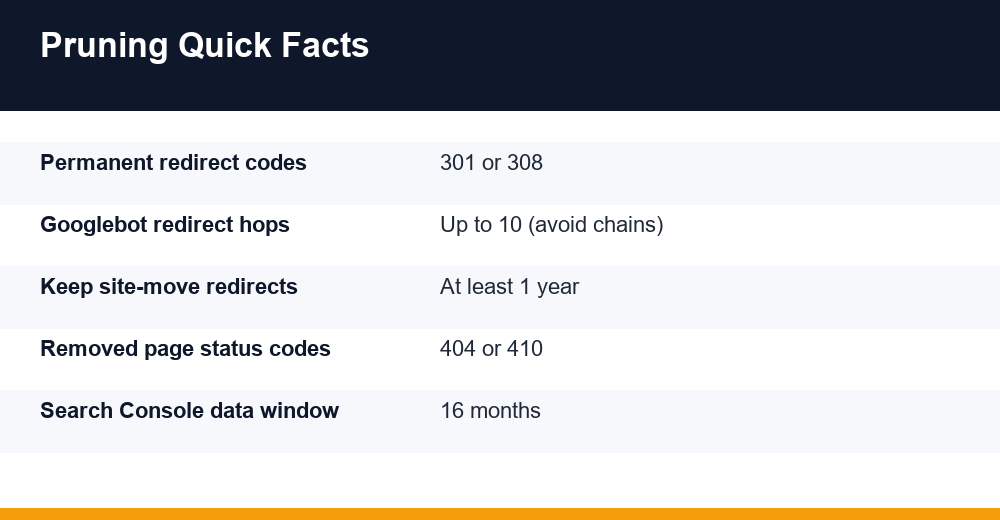
What Is Content Pruning in SEO?
In SEO terms, content pruning means auditing existing URLs and making a deliberate call on each one. It is not the same as routine editing. Fixing a typo is maintenance; deciding that three thin posts about the same topic should become one strong guide is pruning.
The word suggests cutting, but most of the work is actually improving and consolidating. In most audits we run, deletion is the smallest bucket. Far more pages get refreshed, combined with siblings, or pointed at a better URL.
Every page you review ends up in one of five outcomes:
- Keep: the page performs, is accurate and matches search intent.
- Update: the topic still has demand, but the content is stale, thin or misaligned.
- Merge: several pages target the same intent and split signals between them.
- Redirect: the page has no future on its own but holds links or traffic that a closely related page can inherit.
- Remove: the page has no traffic, no links, no business value and no relevant replacement.
Pruning fits inside a broader content marketing strategy. If you don’t know which topics your business wants to own, you can’t judge which old posts support that goal and which ones dilute it.
It also helps to be clear about who owns the process. Writers know the content, SEO leads know the data, and product or sales teams know which pages still matter commercially. A short sign-off from each group prevents a technically sensible cut from removing a page that the sales team sends to prospects every week.
Does Deleting Old Blog Posts Help SEO?
Sometimes, but not because a post is old. Google has repeatedly said that age alone is not a problem, and older content can still be the best answer to a query. Deleting a post just because it was published in 2018 often removes something that was quietly earning links or long-tail visits.
Where removal can help is with genuinely unhelpful pages. Google’s helpful content guidance, whose signals were folded into its core ranking systems in March 2024, has long suggested that removing unhelpful content could help the rankings of your other content. The logic is about overall site quality, not page count.
So the honest answer is: deleting low-value, unrecoverable pages can help, while deleting pages that could be improved usually hurts. That’s why a good pruning process starts with improvement and treats removal as a last resort.
What pruning will not do
- It won’t fix technical problems such as slow pages, blocked crawling or broken canonicals.
- It won’t produce instant gains. Reassessment of site quality can take months.
- It won’t replace new, original content that answers questions your competitors miss.
Expect some ranking volatility for a few weeks after a large cleanup. That’s normal while search engines recrawl, follow redirects and reprocess merged pages.
How Do You Know Which Content to Prune?
Start with data, not instinct. Google Search Console is the most reliable free source because it shows how Google itself sees each URL. The Performance report keeps up to 16 months of data, which is enough to smooth out seasonality.
Pull the right Search Console data
- Open the Performance report, set the date range to the last 12 months and switch to the Pages tab.
- Export clicks, impressions, average position and CTR for every URL.
- Run a date comparison (last 3 months vs the same period last year) to spot pages in decline.
- Check the Page indexing report for URLs marked as crawled or discovered but currently not indexed.
- Open the Queries tab for any URL you’re unsure about to see what it actually ranks for.
The interface only shows a limited number of rows, so large sites may need the Search Console API or a Looker Studio connection to export every URL. Either way, you want one row per page in a spreadsheet before any decisions are made.
Add business and link data
Search Console’s Links report lists your top linked pages, but a backlink tool gives a fuller per-page view. Also pull conversions or leads per URL from your analytics. A page with few clicks that drives demo requests is not a pruning candidate.
Flag pages that match any of these signals:
- Impressions but almost no clicks over 12 months.
- Two or more URLs ranking for the same main query (cannibalization).
- Facts, prices, statistics or product features that are no longer accurate.
- Thin posts that answer one narrow question better covered elsewhere on your site.
- URLs Google has chosen not to index despite being in your sitemap.
Treat any traffic threshold you see online, such as “under 10 visits in six months”, as a rough rule of thumb, not a standard. A niche B2B site and a news blog need very different cut-offs.
Update, Merge, Redirect or Delete: The Decision Framework
Once your spreadsheet is ready, run every flagged URL through the same questions in the same order. Consistency matters more than perfect thresholds, because it stops individual opinions from driving the outcome.
- Does the topic still have search demand or business value? If no, go to step 4.
- Is this the only page on the site targeting that intent? If yes, update it.
- Is another page targeting the same intent? If yes, merge the weaker into the stronger.
- Does the page have backlinks, steady referral traffic or a close topical match elsewhere? If yes, redirect.
- None of the above? Remove it and return a 404 or 410.
| Signal pattern | Recommended action | What to do with the URL |
|---|---|---|
| Good impressions, low CTR, outdated facts | Update | Keep URL, refresh content and title, change date only if edits are substantial |
| Two posts ranking for the same query | Merge | Combine best sections into one URL, 301 the other |
| No demand left, but has backlinks | Redirect | 301 to the closest relevant page |
| Outdated product or event page with a successor | Redirect | 301 to the new version |
| No traffic, no links, no value, no replacement | Delete | Return 404 or 410, remove from sitemap and internal links |
| Low traffic but strong conversions | Keep | Leave live, improve internal linking |
When in doubt between update and delete, choose update. Rewriting costs time; deleting a page that had potential costs both the page and whatever signals it had collected.
Add a “reason” column next to every action. Six months later, nobody will remember why a post was merged, and a one-line note saves the next auditor from undoing a good decision.
Should You Redirect or Delete Old Content?
Google’s own guidance is fairly direct. If a page has moved or has a clear replacement, use a permanent redirect. If you removed a page and there is no similar content on your site, return a 404 or 410 status code.
Google’s documentation on redirects and Google Search recommends permanent server-side redirects (301 or 308) where possible, and treats JavaScript redirects as a fallback for when server-side options aren’t available. Google has also said that permanent redirects don’t cause a loss of PageRank.
Redirect rules that keep you safe
- Match topics. Redirect only to a page that satisfies the same need. Sending many unrelated URLs to your homepage can be treated as a soft 404.
- Avoid chains. Googlebot can follow up to 10 hops, but point old URLs straight at the final destination.
- Keep redirects long-term. Google’s site move guidance suggests leaving them in place for at least a year; indefinitely is safer for pages with backlinks.
- Update old redirects. If page A already redirects to page B and you now merge B into C, change A to point at C.
When deletion is the right call
Delete when there is genuinely nothing to send the visitor to: expired promotions with no successor, test pages, auto-generated tag archives with no unique content, or posts that contradict your current advice. A clean 404 or 410 is better than a misleading redirect.
Also make sure a deleted page actually returns an error code. A “page not found” message served with a 200 status is a soft 404, and it wastes crawling on a URL that should be gone.
A 404 and a 410 behave almost identically in Google Search over time. Pick whichever your CMS or server handles cleanly, and don’t spend hours debating the difference.
A 7-Step Content Pruning Workflow
Here is the sequence we use for client blogs. It moves link equity before anything is removed and leaves a paper trail you can roll back from.
- Inventory every URL. Combine your CMS export, XML sitemap and a crawl so orphaned posts don’t slip through.
- Attach performance data. Add 12 months of Search Console clicks and impressions, backlinks and conversions to each row.
- Group by intent. Cluster URLs by the main query they rank for to expose overlaps and cannibalization.
- Assign an action. Apply the decision framework and record a reason for each choice.
- Map redirects first. Before any page goes offline, list the old URL, the target URL and the status code.
- Execute in batches. Update or merge a manageable group, deploy redirects, then remove the leftovers.
- Monitor and adjust. Compare Search Console data for affected URLs at 4, 8 and 12 weeks, and watch the Page indexing report for new errors.
Batching matters. Pruning hundreds of URLs in one release makes it almost impossible to tell which change caused a drop. Small waves give you clear cause and effect.
How to merge posts properly
Pick the URL with the most links and best rankings as the survivor. Move the strongest unique sections from the other posts into it, rewrite so it reads as one piece, then 301 the old URLs. Don’t simply paste three articles together; readers notice, and so do quality systems.
Check the merged page against the queries each original URL ranked for. If one of them brought in traffic for a specific question, make sure the new page answers that question clearly, ideally under its own heading.
While you’re refreshing pages, structure them so key answers are easy to quote. Short definitions, clear headings and tables help both classic rankings and visibility in AI answers, which we cover in our guide to generative engine optimization.
Fixing Internal Links After You Prune
Redirects are a safety net, not a linking strategy. Every internal link that points to a redirected or deleted URL forces an extra hop or leads to an error, and it signals that your site isn’t well maintained.
- Crawl the site after each batch and export all internal links pointing to 3xx or 4xx URLs.
- Update those links to point directly at the final destination.
- Remove deleted URLs from XML sitemaps so you aren’t asking Google to crawl dead pages.
- Check navigation, sidebars, author pages and related-post widgets, which often hard-code old URLs.
- Give merged pages new internal links from relevant posts so they receive more internal authority than the separate pages had.
Look for orphan pages too. A post with no internal links pointing to it is hard for crawlers and readers to find, and it often looks like a pruning candidate when the real problem is discoverability.
These checks overlap with a regular site health review. Our technical SEO checklist covers redirect chains, status codes and sitemap hygiene in more detail.
How Often Should You Update Old Blog Posts?
There is no official frequency. Google doesn’t reward a post simply for having a new date, so changing the timestamp without meaningful edits achieves nothing. Update when the content needs it, not on an arbitrary schedule.
That said, a rhythm helps teams stay ahead of decay. Most blogs do well with a light review each quarter and a full content pruning audit once or twice a year.
| Content type | Suggested review cadence | Typical trigger |
|---|---|---|
| Statistics, pricing, tool comparisons | Every 3 to 6 months | New data, price or feature changes |
| Platform how-to guides | When the platform changes | Interface or policy updates |
| Evergreen strategy posts | Every 12 months | Declining clicks or new competitors |
| News and announcements | Rarely; review at audit time | Merge or redirect once outdated |
| Top 20 traffic pages | Monthly spot check | Any drop in clicks or CTR |
Prioritize pages with high impressions and falling clicks. They already have Google’s attention, so a solid refresh tends to pay back faster than new content on a topic you haven’t covered before.
Finally, document every decision. A simple log of URL, action, date and reason makes the next audit faster and helps new team members understand why a page disappeared.
Frequently Asked Questions
What is content pruning in SEO?
It is a structured review of existing pages where each URL is kept, updated, merged, redirected or removed based on traffic, links, search intent and business value. The aim is a smaller set of stronger, accurate pages that serve readers better, rather than simply cutting page count or deleting posts because they are old.
Does deleting old blog posts help SEO?
Deleting genuinely unhelpful pages with no traffic, links or replacement can improve how a site is assessed overall, since Google has suggested removing unhelpful content may help other pages. Deleting a post just because it is old usually hurts, because older content can still rank, earn links and answer queries well.
Should I redirect or delete old content?
Use a permanent 301 or 308 redirect when a closely related page can replace the old one, especially if it has backlinks. If there is no relevant replacement, return a 404 or 410. Avoid redirecting unrelated pages to the homepage, which Google may treat as a soft 404.
How often should you update old blog posts?
There is no fixed rule. Update when facts, data or intent change. Many teams spot-check top pages monthly, review fast-changing topics every three to six months, and run a full content pruning audit once or twice a year. Changing the date without real edits brings no benefit.