YouTube SEO for beginners is less about tricks and more about learning what YouTube itself says it rewards: relevance to the search, viewer satisfaction and whether people keep watching. This guide turns YouTube’s and Google’s official documentation into a nine-step routine you can follow for every upload, including how to get your videos into Google’s video results.
Table of Contents
How Does the YouTube Algorithm Rank Videos?
There is no single YouTube algorithm. Search, the homepage, suggested videos, Shorts and subscription feeds each rank content in their own way. They share one idea, though: show each viewer the video they are most likely to watch and be satisfied with.
For search, YouTube says it weighs relevance (how well the title, description and video content match the query), engagement signals for that query, and quality signals about the channel’s expertise and trustworthiness on the topic. Relevance gets you into the running. How people respond after they click decides how long you stay there.
For recommendations, YouTube explains that it relies heavily on watch history and that it uses satisfaction surveys in which viewers rate videos they watched. That matters for anyone starting out. Watch time alone is not the target, because a video people sit through and then regret does not count as a win.
The signals worth caring about
- Relevance: do your title, description and spoken content match what the viewer typed?
- Click-through rate: do people choose your thumbnail and title when they see them?
- Retention: once they click, how much of the video do they watch?
- Satisfaction: likes, shares, survey responses and whether viewers come back.
- Personal context: watch and search history, which you cannot control but can serve by staying consistent on a topic.
The practical takeaway for YouTube SEO for beginners: metadata helps YouTube understand your video, but the audience’s behaviour decides how far it travels. Every step below supports one of those two jobs.
YouTube SEO for Beginners: The 9-Step Workflow
Here is the full routine at a glance. Each step is grounded in YouTube Help or Google Search Central guidance, not in a tool vendor’s tag generator. The sections that follow explain the steps that new creators most often get wrong.
| # | Step | What it influences | Time per video (approx.) |
|---|---|---|---|
| 1 | Pick a topic people actually search (Research tab) | Relevance, demand | 20-30 min |
| 2 | Match the search intent (tutorial, review, comparison) | Satisfaction | 10 min |
| 3 | Write a short, accurate title with key words first | Relevance, CTR | 10 min |
| 4 | Write a unique description, front-loading the first lines | Relevance | 15 min |
| 5 | Add chapters with timestamps | Retention, Google key moments | 5 min |
| 6 | Design an honest, readable custom thumbnail | CTR | 30 min |
| 7 | Open with the payoff, then cut dead air | Retention | During editing |
| 8 | Use tags and hashtags sparingly | Minor discovery help | 2 min |
| 9 | Embed on a dedicated web page and review analytics | Google video results, iteration | 15 min |
Time estimates are approximate and shrink once the routine becomes habit. If you only have time for three steps, prioritise topic choice, title and thumbnail, and the first 30 seconds of the video.
Match the format to the intent
Step 2 is the one most people skip. Before filming, search your phrase and look at what already ranks. If the top results are 10-minute walkthroughs, a 60-second Short will rarely satisfy that viewer, and a 40-minute lecture may lose them before the answer arrives.
- “How to” queries: step-by-step tutorials with the result shown early.
- “Best” or “vs” queries: comparisons with clear criteria and a verdict.
- “What is” queries: short explainers with a simple example.
- Brand or product names: reviews, setup guides and troubleshooting.
One habit ties the steps together: decide the search phrase before you film. YouTube SEO for beginners goes wrong most often when people upload first and then try to bolt keywords onto a video that never answered a real question.
How Do You Find Keywords for YouTube Videos?
Start with the free tool YouTube already gives you. The Research tab in YouTube Studio Analytics shows what people searched for over the last 28 days, both across YouTube and among your own viewers and viewers of similar channels.
- Open YouTube Studio, go to Analytics, then the Research tab.
- Type a broad topic from your niche, such as “email marketing”.
- Review the related searches and note phrases that describe a clear problem.
- Look for content gaps: searches where viewers did not find what they were looking for in the results.
- Check the YouTube search bar’s autocomplete for the same phrase to see how people word it.
- Search the phrase yourself and watch the top three results. Ask what they miss.
If a phrase shows little or no data, YouTube may not have enough searches to estimate interest. That does not always mean zero demand, but for a new channel it is safer to pick phrases with visible interest.
Favour specific, problem-shaped phrases
Broad terms like “marketing” are dominated by large channels. A query such as “how to set up a welcome email sequence” signals a viewer with a concrete task, and a focused tutorial can satisfy them completely. Our step-by-step keyword research guide covers how to judge intent and difficulty, and the same thinking transfers directly to video.
Turn one phrase into a small series
Once you find a phrase that works, the related searches around it usually point to follow-up questions. A channel about email marketing might go from “welcome email sequence” to “welcome email subject lines” and “welcome email examples”. Grouping videos this way helps viewers keep watching your content and gives YouTube a clearer picture of who your channel serves.
Also check your own data. Once you have a few uploads, the traffic source report for YouTube search shows the exact terms that brought viewers to you. Those terms are often the best ideas for your next video.
How Long Should a YouTube Title and Description Be?
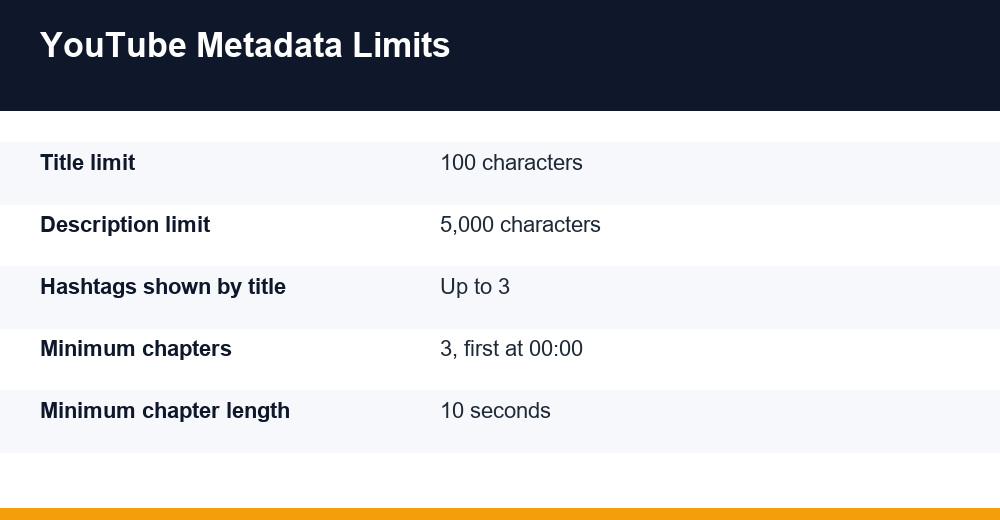
YouTube caps titles at 100 characters and descriptions at 5,000 characters. The limits are generous, but viewers rarely see all of either. Titles are often truncated in search results and on mobile, and only the first lines of a description show before viewers expand it.
Titles: short, accurate, key words first
YouTube’s own title tips are simple: be accurate, keep it short, put the most important words near the beginning, and save episode numbers and branding for the end. A misleading title can hurt discoverability, because viewers who feel tricked stop watching.
- Aim for a title that still makes sense if it is cut off after roughly 50-60 characters (a common working range, not an official rule).
- Use your main search phrase naturally, ideally in the first half.
- Add a reason to click: a result, a time frame or a specific audience.
- Use capitals and emoji sparingly.
Descriptions: the opening lines do the heavy lifting
YouTube advises giving every video a unique description, using one or two main words in both the title and description, and putting the most important information near the start. Copy-pasted boilerplate makes videos look alike and harder to tell apart in search.
- Lines 1-2: say what the viewer will learn, using the main phrase once.
- Next paragraph: a short summary in plain language, with related terms.
- Chapters: timestamps starting at 00:00.
- Links and resources: what you mentioned in the video.
- Channel boilerplate last, kept brief.
A useful description for most tutorials lands somewhere between 150 and 300 words, which is a practical guideline rather than a YouTube requirement. Longer is fine when it genuinely helps, such as recipes, code or reading lists.
Do Tags Still Matter for YouTube SEO?
Barely. YouTube Help states that tags play a minimal role in discovery and are mainly useful when your content is commonly misspelled. Your title, thumbnail and description are far more important.
That is why YouTube SEO for beginners should not start with a tag generator. Add a few tags for genuine misspellings or alternate names (a product called “Mailchimp” often typed as “Mail Chimp”, for example), then move on.
Hashtags work differently
Hashtags are clickable and can lead viewers to other videos using the same tag. YouTube can display the first three hashtags from your description alongside the title. If a video has more than 60 hashtags, YouTube ignores all of them, and adding excessive tags or hashtags can breach its spam and deceptive practices policies.
| Element | Weight in discovery | Beginner rule |
|---|---|---|
| Title | High | Main phrase early, accurate, short |
| Thumbnail | High | Readable at small size, honest |
| Description | Medium to high | Unique, front-loaded, 1-2 key terms |
| Chapters | Medium | 3+ timestamps, first at 00:00 |
| Hashtags | Low to medium | 2-3 relevant ones |
| Tags | Minimal | Only for misspellings and variants |
The weights above summarise YouTube’s guidance as a practical ranking; YouTube does not publish numerical weights.
Thumbnails, CTR and Retention
Once your video is relevant, two numbers decide whether it gets shown more often: how many people click, and how many stay. YouTube counts an impression when a thumbnail is shown for more than one second with at least half of it visible on screen.
According to YouTube Help, half of all channels and videos have an impressions click-through rate between 2% and 10%. New videos with few views swing more widely, so do not panic over the first day’s figure.
Thumbnail checklist
- One clear focal point: a face, an object or a before-and-after.
- Three to five words of text at most, readable on a phone.
- Contrast with YouTube’s interface, so it stands out in both light and dark mode.
- A promise the video actually keeps in the first minute.
Watch for a warning pattern: high CTR combined with low average view duration often means the thumbnail or title over-promises. YouTube’s systems pay attention to whether clicks turn into satisfied viewing, so clickbait tends to cap a video’s reach.
Keep viewers past the first 30 seconds
The audience retention report shows where viewers drop off and how the video compares with your channel’s typical retention for videos of similar length. Use it to fix the intro on your next upload.
- State the outcome in the first sentence instead of a long channel intro.
- Show the end result early, then explain how to get there.
- Cut pauses, repeated points and off-topic tangents.
- Use chapters so viewers can jump to the part they need rather than leaving.
How to Get YouTube Videos Into Google Search
Google already crawls YouTube, so a well-titled video can appear in Google’s video results and the Videos tab without extra work. Two things improve your odds: clear chapters and a supporting page on your own website.
Use chapters for key moments
Google can show key moments that link to specific points in a video, and for YouTube videos it can use the timestamps in your description. YouTube’s chapter rules are strict: list at least three timestamps in ascending order, start the first at 00:00, and keep each chapter at least 10 seconds long.
Embed the video on a dedicated watch page
If you want your own site to rank for the video, Google’s video SEO best practices recommend a watch page where the video is the main content, using a standard embed so Google can find it. Give the page a unique title and description, add VideoObject structured data if you can, and make sure the thumbnail is accessible to Google.
This is where video and written content support each other. A tutorial video can become a blog post with the embed at the top, and a strong blog post can become a video script. Our guide on how to repurpose blog content for social media shows how to plan both formats from one piece of research.
For YouTube SEO for beginners, the Google side is a bonus rather than the foundation. Get the video right on YouTube first, then extend its reach with a page you own.
Measure, Adjust and Repeat
Rankings on YouTube are not fixed at upload. Videos can gain traffic for months as YouTube learns who responds to them, so review each video at about 48 hours, 7 days and 28 days (a practical rhythm, not a YouTube rule).
The YouTube Studio reports to check first
- Traffic sources: how much of your traffic comes from YouTube search versus browse and suggested.
- YouTube search terms: the phrases viewers typed before finding you.
- Impressions and click-through rate: whether your packaging earns the click.
- Audience retention: where viewers leave and which moments they rewatch.
| If you see this | Likely cause | What to try |
|---|---|---|
| Low impressions from search | Weak relevance or low-demand topic | Rework the title and first description lines around the searched phrase |
| Impressions but low CTR | Thumbnail or title not compelling | Test a clearer thumbnail; YouTube Studio offers Test and compare on eligible channels |
| Good CTR, steep early drop-off | Intro does not match the promise | Shorten the intro next time; add chapters |
| Search traffic for unexpected terms | Viewers see a different angle | Make a follow-up video targeting that term |
Change one thing at a time so you can tell what worked. Titles, descriptions and thumbnails can be edited after publishing; the video itself cannot, so apply retention lessons to the next upload.
Finally, YouTube should not live in isolation. Consistent topics help recommendations, and that consistency comes from a plan. Fit your channel into a broader social media marketing strategy so each video has a purpose, an audience and a place to be shared. Practised that way, YouTube SEO for beginners becomes a repeatable process rather than guesswork.
Frequently Asked Questions
How does the YouTube algorithm rank videos?
For search, YouTube matches your title, description and video content to the query, then weighs engagement and quality signals. Recommendations rely heavily on watch history and viewer satisfaction, including survey responses. In short, relevance gets your video considered, while clicks, retention and satisfied viewers decide how widely it is shown over time.
Do tags still matter for YouTube SEO?
Very little. YouTube Help says tags play a minimal role in discovery and mainly help when your topic is commonly misspelled. Spend your time on the title, thumbnail and description instead. Add a few tags for spelling variants, and avoid stuffing tags or hashtags into descriptions, which can breach YouTube’s spam policies.
How do I find keywords for YouTube videos?
Use the Research tab in YouTube Studio Analytics to see what people searched for over the last 28 days and spot content gaps. Check YouTube’s autocomplete for wording, watch the top results to see what they miss, and later review the YouTube search terms report in your own analytics to find proven phrases.
How do I get my YouTube videos to show in Google search?
Give each video a clear, accurate title and a unique description, and add chapters starting at 00:00 so Google can show key moments. To rank your own site as well, embed the video on a dedicated watch page where it is the main content, ideally with VideoObject structured data.